DDL
Note: From Machbase 8.5 or later, a normal user may need database-scoped privileges on
MACHBASEDBto run theCREATEandDROPstatements described on this page. For privilege details, see User Management.
CREATE TABLE
Syntax
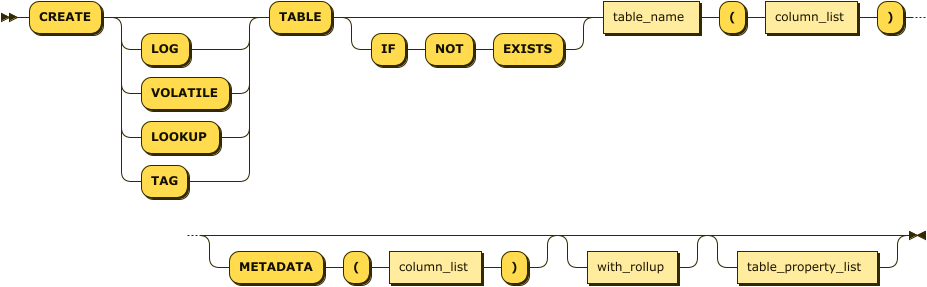
create_table_stmt:
column_list:

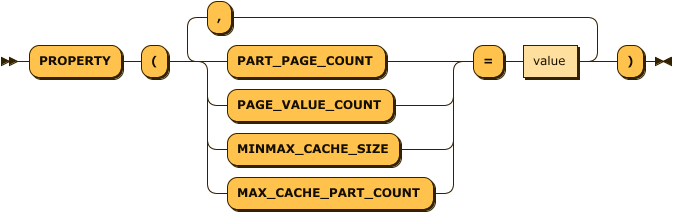
column_property_list:
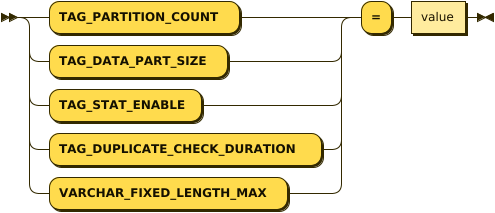
table_property_list:
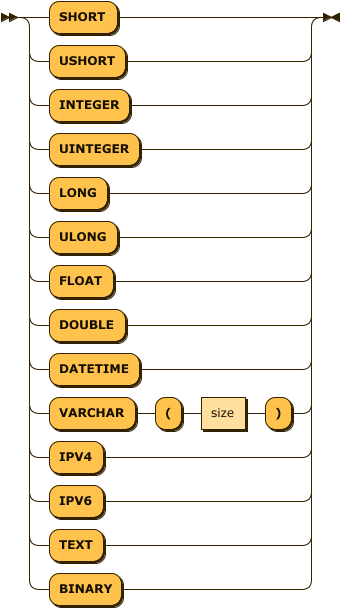
column_type:
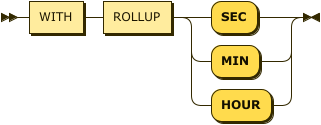
with_rollup:
Create LOG table
-- create ctest LOG table with 5 columns
CREATE TABLE ctest (id INTEGER, name VARCHAR(20), sipv4 IPV4, dipv6 IPV6, comment TEXT);
Create TAG table
TAG tables must have a PRIMARY KEY column and an axis column. A time axis uses DATETIME BASETIME or DATETIME BASE TIME, and a distance axis uses DOUBLE, LONG, or ULONG with BASE DISTANCE or BASEDISTANCE. SUMMARIZED is optional and should be used on value columns that need rollup/statistical tracking.
-- create TAG table
CREATE TAG TABLE tag_time (name VARCHAR(20) PRIMARY KEY, time DATETIME BASETIME, value DOUBLE SUMMARIZED);
CREATE TAG TABLE tag_time_ext (name VARCHAR(20) PRIMARY KEY, time DATETIME BASETIME, value DOUBLE SUMMARIZED, value2 FLOAT, int_column INT);
CREATE TAG TABLE tag_distance (name VARCHAR(20) PRIMARY KEY, distance_m DOUBLE BASE DISTANCE, value DOUBLE, quality INT);
CREATE TAG TABLE tag_distance_meta (name VARCHAR(20) PRIMARY KEY, distance_m LONG BASEDISTANCE, value DOUBLE) METADATA (route_id VARCHAR(20));
Distance-axis columns allow only DOUBLE, LONG, and ULONG. WITH ROLLUP is available only for time-axis tag tables.
For JSON metadata columns and JSON INDEX(...) declarations in TAG metadata, see Tag Metadata.
Rules for naming tables or columns
Table names and column names consist of alphanumeric characters. To use special characters, enclose the name in double quotation marks (").
CREATE TABLE special_tbl ( "with.dot" INTEGER );IF NOT EXISTS
Prevents an error if the table already exists. However, it does not verify that the existing table has the same structure as the one in the CREATE TABLE statement.
This option takes effect only when the existing table is of the same table type.
Table Type
| Table Type | Description |
|---|---|
| LOG | If no keyword is placed between CREATE and TABLE, a log table is created. |
| VOLATILE | VOLATILE_TABLE is a temporary table whose data resides entirely in temporary memory. It can be joined with log tables to improve query results, but its data is lost as soon as the Machbase server shuts down. |
| LOOKUP | Like VOLATILE_TABLE, LOOKUP_TABLE stores all data in memory and can process queries quickly. |
Table Property
Specifies the attributes for the table.
| Property Name | Available Table Types |
|---|---|
| TAG_PARTITION_COUNT | TAG table |
| TAG_DATA_PART_SIZE | TAG table |
| TAG_STAT_ENABLE | TAG table |
| TAG_DUPLICATE_CHECK_DURATION | TAG table |
| VARCHAR_FIXED_LENGTH_MAX | TAG table |
TAG_PARTITION_COUNT(Default:4)
A property supported for TAG tables. It determines how many internal partition tables store the TAG table. Set it according to the number of tags and the performance of the server.
TAG_DATA_PART_SIZE(Default:16MB)
A property supported for TAG tables. It determines the data size of each partition table.
TAG_STAT_ENABLE(Default:1)
A property supported for TAG tables. It determines whether to store statistics for each TAG ID.
TAG_DUPLICATE_CHECK_DURATION(Default:0, Max:43200)
A property supported for TAG tables. It sets, in minutes, the period in which duplicates can be removed, based on the current system time. Duplicates are removed only for data within this period from the current system time. If the period is 0, duplicate removal is not performed.
VARCHAR_FIXED_LENGTH_MAX (Default: 15, Max: 127)
Specifies the maximum length of VARCHAR data stored in the fixed area of the internal file.
Column Property
Specifies the attribute for the column.
| Property Name | Available Table Types |
|---|---|
| PART_PAGE_COUNT | LOG TABLE |
| PAGE_VALUE_COUNT | LOG TABLE |
| MAX_CACHE_PART_COUNT | LOG TABLE |
| MINMAX_CACHE_SIZE | LOG TABLE |
PART_PAGE_COUNT
This property represents the number of pages in a partition. The number of values in a partition is PART_PAGE_COUNT * PAGE_VALUE_COUNT.
PAGE_VALUE_COUNT
This property represents the number of values in a page.
MAX_CACHE_PART_COUNT (Default : 0)
This property sets a cache area to improve performance.
When Machbase accesses a partition, it first looks for the in-memory structure that holds the meta information of that partition. This property determines how many partitions’ information is kept in memory. A larger value helps performance but increases memory usage. The minimum value is 1 and the maximum value is 65535.
MINMAX_CACHE_SIZE (Default : 10240)
This property specifies how much cache memory to use for the MINMAX of the column. The default is 100MB for _ARRIVAL_TIME, the 0th hidden column, and 10KB for other columns. This size can be changed after the table is created with the “ALTER TABLE MODIFY” statement.
NOT NULL Constraint
Specify NOT NULL if the column must not allow NULL, and omit it if NULL is allowed (default).
To drop or add this constraint after the table is created, use the ALTER TABLE MODIFY COLUMN command.
-- Column c1 is not null and c2 is created without not null constraint.
CREATE TABLE t1(c1 INTEGER NOT NULL, c2 VARCHAR(200));
Pre-defined System Columns
When you create a table with the CREATE TABLE statement, the system creates two additional predefined system columns: _ARRIVAL_TIME and _RID.
The _ARRIVAL_TIME column is a DATETIME column filled with the system time at which data is inserted by an INSERT statement or AppendData, and its value can be used as the unique key of the generated record. You can specify the value of this column in machloader or an INSERT statement if the order is guaranteed (from past to present). When data is retrieved with the DURATION condition, data is retrieved based on the value of this column.
The _RID column holds a unique value that the system generates for each record. The data type of this column is a 64-bit integer. The user cannot specify a value for this column or create an index on it. The value is generated automatically when data is inserted. You can retrieve records by the value of the _RID column.
create volatile table t1111 (i1 integer);
Created successfully.
Mach> desc t1111;

----------------------------------------------------------------
NAME                          TYPE                LENGTH
----------------------------------------------------------------
_ARRIVAL_TIME                 datetime            8
I1                            integer             4

Mach>insert into t1111 values (1);
1 row(s) inserted.
Mach>select _rid from t1111;
_rid
-----------------------
0
[1] row(s) inserted.

Mach>select i1 from t1111 where _rid = 0;
i1
--------------
1
[1] row(s) selected.
Min Max Cache
The Concept of Min-Max Cache
In a typical disk-based DBMS, a search for a specific value through an index accesses the disk area that contains the index and then reads the final disk page that contains the value.
Machbase, on the other hand, partitions data chronologically to maintain time series information, which means that the information of an index is split into many files in chronological order. Therefore, a search through a Machbase index reads these partitioned index files sequentially.
If the data to be searched spans 1000 partitions, 1000 files must be opened and searched every time. Although Machbase uses an efficient columnar structure, this I/O cost is proportional to the number of index partitions, and the MINMAX_CACHE structure is how Machbase reduces it.
MINMAX_CACHE is a contiguous memory space that keeps the index file information of each partition, namely the minimum and maximum values of the column, in memory. When searching for partitions that contain a specific value, a partition can be skipped entirely if the value is smaller than its minimum or larger than its maximum, which enables high-performance data analysis.
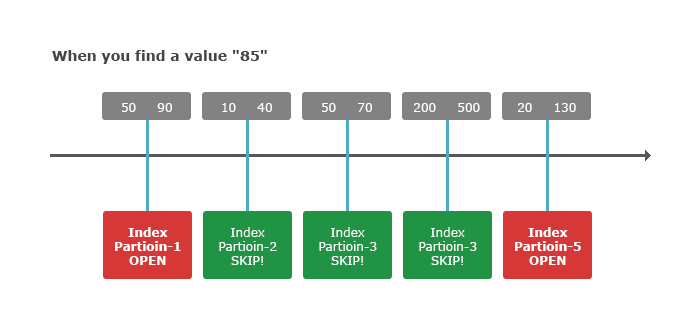
As shown in the figure above, to find the value 85, only partitions 1 and 5, whose MIN/MAX range includes the value, are actually searched among the 5 partitions, and partitions 2, 3, and 4 are skipped entirely.
Min-Max Cache Column
You can decide whether to use MINMAX Cache for a particular column when creating the table.
If MINMAX_CACHE_SIZE of a column is set to a value other than 0, MINMAX Cache is used when an index search is performed on that column. It is not used if MINMAX_CACHE_SIZE = 0.
Note the following when using MINMAX Cache.
- MINMAX Cache applies even if no index is explicitly created on the column.
- MINMAX_CACHE_SIZE is set to 10KB for all columns by default, and you can reset it to a suitable memory size with the ALTER TABLE syntax.
- The hidden column _arrival_time uses 100MB by default and uses MINMAX Cache memory automatically.
- VARCHAR columns are not covered by MINMAX Cache. Therefore, explicitly specifying caching for a VARCHAR column returns an error.
- Each table you create can use up to MINMAX_CACHE_SIZE of additional memory, as set in the property. The memory grows gradually as the number of partitions increases, up to that maximum.
- If the table has no records, no MINMAX Cache memory is allocated.
The following examples create tables with MINMAX Cache settings.
-- MINMAX_CACHE_SIZE = 0 for VARCHAR is allowed semantically.
CREATE TABLE ctest (id INTEGER, name VARCHAR(100) PROPERTY(MINMAX_CACHE_SIZE = 0));
Created successfully.
Mach>

-- Cache applied to id column.
CREATE TABLE ctest2 (id INTEGER PROPERTY(MINMAX_CACHE_SIZE = 10240), name VARCHAR(100) PROPERTY(MINMAX_CACHE_SIZE = 0));
Created successfully.
Mach>

-- Applied to id1, id2, and id3.
CREATE TABLE ctest3 (id1 INTEGER PROPERTY(MINMAX_CACHE_SIZE = 10240), name VARCHAR(100) PROPERTY(MINMAX_CACHE_SIZE = 0), id2 LONG PROPERTY(MINMAX_CACHE_SIZE = 1024), id3 IPV4 PROPERTY(MINMAX_CACHE_SIZE = 1024), id4 SHORT);
Created successfully.
Mach>

-- MINMAX_CACHE_SIZE is specified in column units or set to 0.
CREATE TABLE ctest4 (id1 INTEGER PROPERTY(MINMAX_CACHE_SIZE=10240), name VARCHAR(100) PROPERTY(MINMAX_CACHE_SIZE=0), id2 LONG PROPERTY(MINMAX_CACHE_SIZE=10240), id3 IPV4 PROPERTY(MINMAX_CACHE_SIZE=0), id4 SHORT);
Created successfully.
Mach>
Primary Key
This is a constraint that can be assigned to a Volatile/Lookup table column, and it prevents
duplicate values in that column. A Lookup table must have a primary key. A Volatile table can omit the primary key,
but INSERT ... ON DUPLICATE KEY UPDATE can be used only when the target table
has a primary key.
When a primary key is assigned, a red-black tree index corresponding to the primary key is generated.
Sequence Column
SEQUENCE for Lookup Table
Sequence was added to generate unique records in a Lookup table and to determine the order in which data is entered.
When a Lookup table uses a datetime column to order records, duplicate datetime values make the order of records hard to distinguish and can cause application errors due to duplicate data. Sequence was added to solve these problems.
Configuring Sequence when Creating Lookup Tables
When creating a Lookup table with a CREATE TABLE statement, add a PROPERTY clause to the column to be used as the Sequence.
A Sequence column supports only the LONG data type (64-bit, unsigned).
You can also set the start value of the Sequence. If it is set to 1, the Sequence starts from 1. (0 and negative numbers are not supported.)
CREATE LOOKUP TABLE table_name (v1 LONG PROPERTY(SEQUENCE=1) PRIMARY KEY, v2 VARCHAR(10));Use of sequence column
The Sequence column of a Lookup table can be used just like a regular LONG column. When used this way, the Sequence value does not increase automatically.
You can enter values directly into the Sequence column, including duplicate values.
To use the Sequence feature, use nextval, a new Sequence-only function, to increase the Sequence value.
Machbase internally keeps the largest value of the Sequence column, so a value inserted later with the nextval function is the largest Sequence column value + 1.
Example of Sequence column
-- Insert the following Sequence value using nextval Function in the Sequence column.
INSERT INTO table_name (v1, v2) values (nextval(v1), 'aaaa');

-- Insert a value directly into the Sequence column
INSERT INTO table_name (v1, v2) values (100, 'aaaa');

-- Insert a computed value into the Sequence column.
INSERT INTO table_name (v1, v2) values (100 + 1, 'aaaa');

-- Success Select of Lookup Tables with Sequence Columns
SELECT v1, v2 FROM table_name;

-- Invalid Select for Sequence column (nextval column can only be used in insert query)
SELECT nextval(v1), v2 FROM table_name;
CREATE VIEW / DROP VIEW
VIEW stores a SELECT definition as a named logical object for reuse.
Unlike a table, a VIEW does not store data separately. When queried, the stored
definition SQL is expanded and executed again.
CREATE VIEW v_example AS
SELECT id, name
FROM t1;

DROP VIEW v_example;
For the full description including CREATE OR REPLACE VIEW, DROP VIEW IF EXISTS,
SHOW VIEWS, M$SYS_VIEWS, performance/limits, and Tag / BINARY examples,
see VIEW.
DROP TABLE
drop_table_stmt:

drop_table_stmt ::= 'DROP TABLE' table_nameDeletes the specified table. However, the statement fails with an error if another session is searching the table.
-- Example
DROP TABLE TableName;
CREATE TABLESPACE
create_tablespace_stmt:

datadisk_list:
data_disk:

data_disk_property:

create_tablespace_stmt ::= 'CREATE TABLESPACE' tablespace_name 'DATADISK' datadisk_list
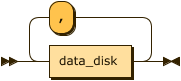
datadisk_list ::= data_disk ( ',' data_disk )*
data_disk ::= disk_name data_disk_property
data_disk_property ::= '(' 'DISK_PATH' '=' '"' path '"' ( ',' 'PARALLEL_IO' '=' number )? ')'
-- Example
create tablespace tbs1 datadisk disk1 (disk_path=""); -- $MACHBASE_HOME/dbs/ (Create in $MACHBASE_HOME/dbs/)
create tablespace tbs1 datadisk disk1 (disk_path="tbs1_disk1"); -- $MACHBASE_HOME/dbs/tbs1_disk1 (Created in $MACHBASE_HOME/dbs/tbs1_disk1. tbs1_disk1 folder must exist)
create tablespace tbs2 datadisk disk1 (disk_path="tbs2_disk1", parallel_io = 5);
create tablespace tbs1 datadisk disk1 (disk_path="tbs1_disk1", parallel_io = 10), disk2 (disk_path="tbs1_disk2"), disk3 (disk_path="tbs1_disk3");The CREATE TABLESPACE statement creates, in $MACHBASE_HOME/dbs/, a tablespace in which log tables or their indexes are stored.
A tablespace can have multiple disks. The partition files that store table and index data are distributed across the data disks that belong to the tablespace.
If two or more disks are used, the index and table files are distributed across the disks, and I/O is performed in parallel on each device. As the number of disks increases, disk I/O throughput increases, so a large amount of data can be written to disk quickly.
Also, if you create separate tablespaces for tables and indexes and define different disks for them, the I/O of tables and indexes can be separated logically without reconfiguring the physical disks.
DATA DISK
Defines a disk that belongs to a tablespace. Each disk has the following properties.
| Property | Description |
|---|---|
| data_disk_property | Specifies the attributes of the disk. |
| disk_name | Specifies the name of the Disk object. It is used later to change the attributes of the Disk object with the ALTER TABLESPACE syntax. |
| disk_path | Specifies the directory path of the disk. The directory must already exist. When a relative path is specified, PATH is resolved based on $MACHBASE_HOME/dbs. For example, if PATH = ‘disk1’, Disk Path is recognized as $MACHBASE_HOME/dbs/disk1. |
| parallel_io | Determines how many disk I/O requests can run in parallel. (DEF: 3, MIN: 1, MAX: 128) |
DROP TABLESPACE
drop_tablespace_stmt:

drop_table_stmt ::= 'DROP TABLESPACE' tablespace_nameDeletes the specified tablespace. However, deletion fails if objects created in the tablespace still exist.
-- Example
DROP TABLESPACE TablespaceName;
CREATE INDEX
create_index_stmt:

index_type:
table_space:

index_property_list:
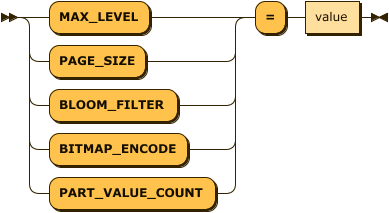
create_index_stmt ::= 'CREATE' 'INDEX' index_name 'ON' table_name '(' column_name ')' index_type? table_space? index_property_list?
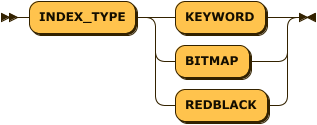
index_type ::= 'INDEX_TYPE' ( 'LSM' | 'KEYWORD' | 'BITMAP' | 'REDBLACK' )
table_space ::= 'TABLESPACE' table_space_name
index_property_list ::= ( 'MAX_LEVEL' | 'PAGE_SIZE' | 'BITMAP_ENCODE' | 'PART_VALUE_COUNT' ) '=' value
Index Type
Specifies the type of index to create. For indexes other than a keyword index, if the index type is not specified, the index is created with the default index type of the table type.
| Table Type | Default Index Type |
|---|---|
| Volatile Table | REDBLACK |
| Lookup Table | REDBLACK |
| Log Table | LSM |
KEYWORD Index
This is an index for text search. It can be created only on VARCHAR and TEXT columns of a log table, and only on a single column.
LSM Index
LSM (Log Structure Merge) Index is an index optimized for storing and searching big data. The partitions of an LSM index are maintained per level, and lower-level partitions are merged and moved to the upper level. The lower partitions used to build a higher-level partition are then deleted.
This index level partition building is performed by a background thread. Because an upper-level partition is created by merging lower-level partitions into one, searching through the index has the following advantages.
- A duplicated key is stored only once, which saves disk space for key storage.
- Searching one index partition instead of multiple partitions reduces the cost of opening and closing files, and also reduces the number of index pages accessed.
LSM Index Property
| Item | Description |
|---|---|
| MAX_LEVEL (DEFAULT = 3, MIN = 0, MAX = 3 ) | The maximum level of the LSM index. Currently, 3 is the maximum value. The maximum number of records in one partition cannot exceed 200 million. The partition size of each level is the number of values of the previous level’s partition * 10. For example, if MAX_LEVEL = 3 and PART_VALUE_COUNT is 100,000, then Level 0 = 100,000, Level 1 = 1,000,000, Level 2 = 10,000,000, and Level 3 = 100,000,000. If the partition size of the last level exceeds 200 million, index creation fails. |
| PAGE_SIZE (DEFAULT = 512 * 1024, MIN = 32 * 1024,MAX = 1 * 1024 * 1024) | Specifies the size of the page in which index key values and bitmap values are stored. The default is 512K. |
| BITMAP_ENCODE (DEFAULT = EQUAL, RANGE) | Sets the bitmap type of the index. BITMAP_ENCODE = EQUAL (default) generates a bitmap for values equal to the key value, and BITMAP = RANGE generates a bitmap according to the range of the key value. Set BITMAP_ENCODE = EQUAL when queries mainly use = as the condition, and BITMAP_ENCODE = RANGE when queries mainly use a specific range as the condition. With BITMAP = RANGE, the creation cost is slightly higher than with EQUAL. |
BITMAP Index
This is an index for data analysis and can be created only on log tables. It can be created on any column except VARCHAR, TEXT, and BINARY columns, and only on a single column.
RED-BLACK Index
This is a memory index for real-time data retrieval and can be created only on Volatile/Lookup tables. It can be created on any column of these tables, and only on a single column.
Index Property
The properties that can be applied in the LSM Index are as follows.
PART_VALUE_COUNT
Indicates the number of rows stored in a partition of the index.
-- Example
-- Index applied to c1 column.
CREATE INDEX index1 on table1 ( c1 );
-- LSM index applied explicitly.
CREATE INDEX index_lsm on table1 ( c1 ) INDEX_TYPE LSM;
-- Keyword index applied to var_column of varchar type, and page_size unit is 100000.
CREATE INDEX index2 on table1 (var_column) INDEX_TYPE KEYWORD PAGE_SIZE=100000;
JSON path indexes
When creating an index on a member of a JSON column, you can use both the existing JSONPath arrow syntax and JSON dot shorthand.
CREATE TAG TABLE tag_log (
    name  VARCHAR(40) PRIMARY KEY,
    time  DATETIME BASETIME,
    value JSON
);

-- JSON dot shorthand
CREATE INDEX tag_log_sensor_idx ON tag_log (value.sensor.name);

-- Existing JSONPath arrow syntax
CREATE INDEX tag_log_metric_idx ON tag_log (value->'$.metric');

-- Array index and double quoted key
CREATE INDEX tag_log_item_idx ON tag_log (value.items[0]."product-id");
The existing arrow DDL syntax also remains available when the JSON column name is double quoted or is a keyword column name.
CREATE TAG TABLE tag_log_q (
    name    VARCHAR(40) PRIMARY KEY,
    time    DATETIME BASETIME,
    "value" JSON
);

CREATE INDEX tag_log_q_idx ON tag_log_q ("value"->'$.sensor.name');

CREATE TAG TABLE tag_log_kw (
    name   VARCHAR(40) PRIMARY KEY,
    time   DATETIME BASETIME,
    "LEFT" JSON
);

CREATE INDEX tag_log_kw_idx ON tag_log_kw (left->'$.sensor.name');
String comparison predicates can use JSON path indexes. Predicates with numeric or boolean meaning are not used as JSON path index range predicates because string ordering and numeric ordering can differ.
For TAGDATA metadata JSON path indexes, see Tag Metadata and Tag Table Indexes.
DROP INDEX
drop_index_stmt:

drop_index_stmt ::= 'DROP INDEX' index_nameDeletes the specified index. However, the statement fails with an error if another session is searching the table.
-- Example
DROP INDEX IndexName;
ALTER TABLE
The ALTER TABLE statement is used to change the schema information of the specified table.
- Most ALTER TABLE operations are available only for Log Tables.
- The RENAME COLUMN operation is available for both Log Tables and Tag Tables.
ALTER TABLE SET
This syntax changes the properties of a table. Currently there are no dynamically changeable properties.
ALTER TABLE ADD COLUMN
alter_table_add_stmt:

alter_table_add_stmt ::= 'ALTER TABLE' table_name 'ADD COLUMN' '(' column_name column_type ( 'DEFAULT' value )? ')'This syntax adds a column to the table in real time. You specify the name and type of the column, and you can set the default data value with the DEFAULT clause.
-- Example-1
alter table atest2 add column (id4 float);

-- Example-2
alter table atest2 add column (id6 double  default 5);
alter table atest2 add column (id7 ipv4  default '192.168.0.1');
alter table atest2 add column (id8 varchar(4) default 'hello');
ALTER TABLE DROP COLUMN
alter_table_drop_stmt:

alter_table_drop_stmt ::= 'ALTER TABLE' table_name 'DROP COLUMN' '(' column_name ')'This syntax deletes a specific column from the table in real time.
-- Example
alter table atest2 drop column (id4);
alter table atest2 drop column (id8);
ALTER TABLE METADATA ADD COLUMN
alter_table_metadata_add_stmt:
alter_table_metadata_add_stmt ::= 'ALTER TABLE' table_name 'METADATA ADD COLUMN' '(' column_name column_type ( 'DEFAULT' value )? ')'This syntax adds a metadata column to a TAG table. Metadata columns store tag-specific information that doesn’t change frequently with each data point.
Note: This operation is only available for TAG tables.
-- Example: Add metadata columns to a TAG table
ALTER TABLE altertbl METADATA ADD COLUMN (m1 DOUBLE);
ALTER TABLE altertbl METADATA ADD COLUMN (m2 VARCHAR(100));
ALTER TABLE altertbl METADATA ADD COLUMN (m3 INTEGER DEFAULT 0);
ALTER TABLE METADATA DROP COLUMN
alter_table_metadata_drop_stmt:
alter_table_metadata_drop_stmt ::= 'ALTER TABLE' table_name 'METADATA DROP COLUMN' '(' column_name ')'This syntax removes a metadata column from a TAG table.
Note: This operation is only available for TAG tables.
-- Example: Drop metadata columns from a TAG table
ALTER TABLE altertbl METADATA DROP COLUMN (m1);
ALTER TABLE altertbl METADATA DROP COLUMN (m2);
ALTER TABLE RENAME COLUMN
alter_table_column_rename_stmt:

alter_table_column_rename_stmt ::= 'ALTER TABLE' table_name 'RENAME COLUMN' old_column_name 'TO' new_column_nameThis syntax changes the name of a specific column in a table. This operation is available for both Log Tables and Tag Tables.
-- Example for Log Table
alter table atest2 rename column id7 to id7_rename;

-- Example for Tag Table
alter table tag rename column v0001 to vmax;Note: For Tag Tables, you can rename any column, including additional value columns as well as PRIMARY KEY, BASETIME, and METADATA columns. However, renaming columns may be restricted if ROLLUP tables are defined on the tag table.
Note: RENAME COLUMN operation for Tag Tables is supported from Machbase version 8.0.50 or later.
ALTER TABLE MODIFY COLUMN
alter_table_modify_stmt:
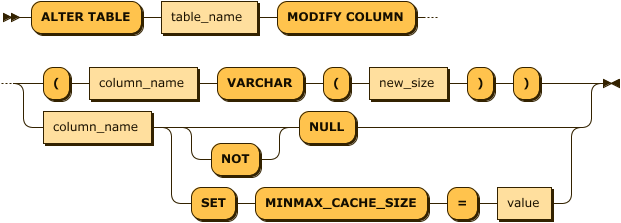
alter_table_modify_stmt ::= 'ALTER TABLE' table_name 'MODIFY COLUMN' ( '(' column_name 'VARCHAR' '(' new_size ')' ')' | column_name ( 'NOT'? 'NULL' | 'SET' 'MINMAX_CACHE_SIZE' '=' value ) )This syntax changes the properties of a specific column in a table. Currently, you can change the column length of VARCHAR columns, and the MINMAX CACHE attribute and NOT NULL constraint of columns of other types.
VARCHAR SIZE
This syntax supports changing the column length of VARCHAR columns only. To preserve existing data, the length cannot be reduced and must always be increased.
ALTER TABLE table_name MODIFY COLUMN (column_name VARCHAR(new_size));-- Example: Assume TABLE is created like this.
-- create table atest5 (id integer, name varchar(5), id3 double, id4 float);
-- Error occurred: Can not change to another type,
alter table atest5 modify column (id varchar(10));
-- Error occurred: VARCHAR length can not be made smaller.
alter table atest5 modify column (name varchar(3));
-- Error occurred: Maximum size of VARCHAR can not exceed 32767.
alter table atest5 modify column (name varchar(32768));
-- Success
alter table atest5 modify column (name varchar(128));MINMAX_CACHE_SIZE
This syntax changes MINMAX_CACHE_SIZE for a particular column.
ALTER TABLE table_name MODIFY COLUMN column_name SET MINMAX_CACHE_SIZE=value;-- Example: Assume TABLE is created like this.
create table atest9 (id integer, name varchar(100));
-- Error: Does not apply to VARCHAR.
alter table atest9 modify column name set minmax_cache_size=0;
[ERR-02139 : MINMAX CACHE is not allowed for VARCHAR column(NAME).]
-- Change success
alter table atest9 modify column id set minmax_cache_size=10240;NOT NULL
Adds a NOT NULL constraint to the column. The DDL operation fails if the column already contains NULL values.
To allow NULL values in a column, use the MODIFY COLUMN NULL command described next.
ALTER TABLE table_name MODIFY COLUMN column_name NOT NULL;-- Add NOT NULL constraint to t1.c1.
alter table t1 modify column c1 not null;NULL
Releases the NOT NULL constraint so that NULL values can be entered. The column no longer benefits from the performance improvement of the min_max cache of the LSM index.
ALTER TABLE table_name MODIFY COLUMN column_name NULL;-- Release NOT NULL constraint at t1.c1.
alter table t1 modify column c1 null;ALTER TABLE RENAME TO
alter_table_rename_stmt:

alter_table_rename_stmt ::= 'ALTER TABLE' table_name 'RENAME TO' new_nameChanges the name of the table.
Meta tables cannot be renamed, and the new name cannot contain the $ character. Only Log tables can be renamed.
-- Change the name of worker table to employee.
ALTER TABLE worker RENAME TO employee;
ALTER TABLE ADD RETENTION
alter_table_add_retention_stmt:
alter_table_add_retention_stmt ::= 'ALTER TABLE' table_name 'ADD RETENTION' policy_name
ALTER TABLE tag ADD RETENTION policy_1d_1h;ALTER TABLE DROP RETENTION
alter_table_drop_retention_stmt:
alter_table_drop_retention_stmt ::= 'ALTER TABLE' table_name 'DROP RETENTION'
ALTER TABLE tag DROP RETENTION;ALTER TABLESPACE
The ALTER TABLESPACE statement is used to change the information associated with the specified tablespace.
ALTER TABLESPACE MODIFY DATADISK
This syntax is used to change the properties of DATADISK in Tablespace.
alter_tablespace_stmt:

alter_tablespace_stmt ::= 'ALTER TABLESPACE' table_name 'MODIFY DATADISK' disk_name 'SET' 'PARALLEL_IO' '=' value-- Example
ALTER TABLESPACE tbs1 MODIFY DATADISK disk1 SET PARALLEL_IO = 10;TRUNCATE TABLE
truncate_table_stmt:

truncate_table_stmt ::= 'TRUNCATE TABLE' table_name-- Delete all data in ctest table.
Mach> truncate table ctest;
Truncated successfully.Deletes all data in the specified table. However, the statement fails with an error if another session is searching the table.
CREATE ROLLUP
create_rollup_stmt:
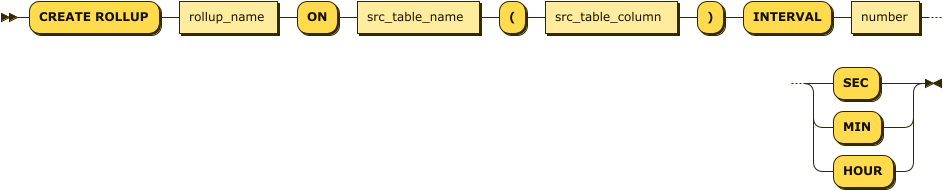
create_rollup_stmt ::= 'CREATE ROLLUP' rollup_name 'ON' src_table_name '('src_table_column')' 'INTERVAL' number ('SEC' | 'MIN' | 'HOUR')-- Creates a rollup targeting the value column of the tag table.
Mach> CREATE ROLLUP _rollup_tag_value_sec ON tag(value) INTERVAL 1 SEC;
Executed successfullyWhen you use a member of a JSON column as the rollup target value, you can use both the existing JSONPath arrow syntax and JSON dot shorthand.
CREATE TAG TABLE tag_json (
    name  VARCHAR(40) PRIMARY KEY,
    time  DATETIME BASETIME,
    value JSON
);

-- JSON dot shorthand
CREATE ROLLUP tag_json_metric_ru
ON tag_json (value.metric)
INTERVAL 1 SEC;

-- Existing JSONPath arrow syntax
CREATE ROLLUP tag_json_metric_arrow_ru
ON tag_json (value->'$.metric')
INTERVAL 1 SEC;

-- Array index and double quoted key
CREATE ROLLUP tag_json_item_ru
ON tag_json (value.items[0]."metric-id")
INTERVAL 1 SEC;
Quoted column names and keyword column names are also still supported with the existing arrow syntax.
CREATE TAG TABLE tag_json_q (
    name    VARCHAR(40) PRIMARY KEY,
    time    DATETIME BASETIME,
    "value" JSON
);

CREATE ROLLUP tag_json_q_ru
ON tag_json_q ("value"->'$.metric')
INTERVAL 1 SEC;

CREATE TAG TABLE tag_json_kw (
    name   VARCHAR(40) PRIMARY KEY,
    time   DATETIME BASETIME,
    "LEFT" JSON
);

CREATE ROLLUP tag_json_kw_ru
ON tag_json_kw (left->'$.metric')
INTERVAL 1 SEC;
If corrected source data requires existing rollup results to be rebuilt, see Rollup Rebuild Guide.
create_conditional_rollup_stmt ::= 'CREATE ROLLUP' rollup_name
                                   ( 'ON' src_table_name '('src_table_column')'
                                   | 'FROM' src_rollup_table_name )
                                   'INTERVAL' number ('SEC' | 'MIN' | 'HOUR')
                                   'WHERE' predicate
-- Conditional rollup: aggregates only rows where value2 = 0
Mach> CREATE ROLLUP _rollup_tag_value_min_ok
ON tag(value)
INTERVAL 1 MIN
WHERE value2 = 0;
Executed successfullycreate_custom_rollup_stmt ::= 'CREATE ROLLUP' rollup_name
'INTO' '(' dest_table_name ')'
'AS' '(' select_stmt ')'
'INTERVAL' number ('SEC' | 'MIN' | 'HOUR')
[ 'WAKEUP INTERVAL' number ('SEC' | 'MIN' | 'HOUR') ]-- Creates a custom rollup that stores user-defined aggregation into a TAG table.
Mach> CREATE ROLLUP rollup_stock_1m
INTO (stock_rollup_1m)
AS (
SELECT code,
DATE_TRUNC('minute', time) AS time,
SUM(price) AS sum_price,
COUNT(*) AS cnt
FROM stock_tick
GROUP BY code, time
)
INTERVAL 1 MIN;
Executed successfullyNotes
- Use conditional rollup
WHEREwith theON/FROMrollup syntax. - For Custom Rollup, use
WHEREonly inside theSELECT. - External
INTERVAL ... WHERE ...is not supported for Custom Rollup syntax. - For full constraints and query patterns, see Custom Rollup: User-Defined Aggregation.
DROP ROLLUP
drop_rollup_stmt:

drop_rollup_stmt ::= 'DROP ROLLUP' rollup_name-- drop rollup.
Mach> DROP ROLLUP _rollup_tag_value_sec;
Executed successfullyALTER ROLLUP
Controls rollup workers and their wakeup interval.
alter_rollup_start_stop_stmt ::= 'ALTER ROLLUP' rollup_name ( 'START' | 'STOP' )
alter_rollup_force_stmt      ::= 'ALTER ROLLUP' rollup_name 'FORCE'
alter_rollup_wakeup_stmt     ::= 'ALTER ROLLUP' rollup_name 'WAKEUP'
alter_rollup_wakeup_int_stmt ::= 'ALTER ROLLUP' rollup_name 'SET WAKEUP INTERVAL' number ( 'SEC' | 'MIN' | 'HOUR' )
Examples
-- Start/stop a rollup thread
ALTER ROLLUP _rollup_tag_value_sec START;
ALTER ROLLUP _rollup_tag_value_sec STOP;

-- Wake the thread now (non-blocking)
ALTER ROLLUP _rollup_tag_value_sec WAKEUP;

-- Run immediately and wait for completion
ALTER ROLLUP _rollup_tag_value_sec FORCE;

-- Tighten the wakeup interval (must divide the rollup interval)
ALTER ROLLUP _rollup_tag_value_sec SET WAKEUP INTERVAL 1 SEC;
Rules
- The wakeup interval must be greater than 0, must not be larger than the rollup interval, and must evenly divide the rollup interval; otherwise, an error is returned.
WAKEUPonly pokes the thread and returns immediately. UseFORCEwhen you need to block until catch-up finishes.
CREATE RETENTION
create_retention_stmt:
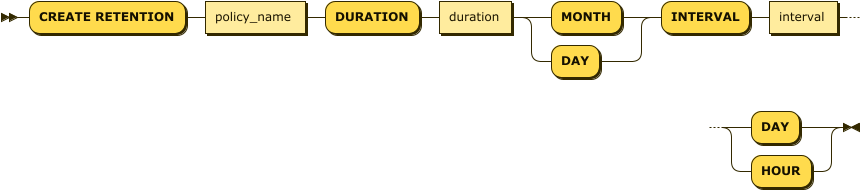
create_retention_stmt ::= 'CREATE RETENTION' policy_name 'DURATION' duration ( 'MONTH' | 'DAY' ) 'INTERVAL' interval ( 'DAY' | 'HOUR' )-- Creates a retention policy.
Mach> CREATE RETENTION policy_1d_1h DURATION 1 DAY INTERVAL 1 HOUR;
Executed successfullyDROP RETENTION
drop_retention_stmt:

drop_retention_stmt ::= 'DROP RETENTION' policy_name-- Drops the retention policy.
Mach> DROP RETENTION policy_1d_1h;
Executed successfully