User Management
Index
- CREATE USER
- DROP USER
- ALTER USER
- PASSWORD POLICY
- Generate AUTH KEY Files
- Create a User with AUTH KEY
- Manage AUTH KEY
- Query AUTH KEY Metadata
- CONNECT
- GRANT/REVOKE
- Managing User Example
CREATE USER
create_user_stmt:

create_user_stmt ::= 'CREATE USER' user_name 'IDENTIFIED BY' passwordThe syntax for creating a user is:
-- Example
CREATE USER new_user IDENTIFIED BY password
To specify a password policy at the same time, use the extended syntax below.
CREATE USER user_name IDENTIFIED BY password PASSWORD POLICY { NONE | LOW | HIGH }Examples:
CREATE USER app_user IDENTIFIED BY "Aa!StrongPwd1" PASSWORD POLICY LOW;
CREATE USER ops_user IDENTIFIED BY "Bb@StrongPwd2" PASSWORD POLICY HIGH;
User names are converted to uppercase when they are created. For example,
CREATE USER app_user ... is stored and displayed as APP_USER in metadata tables and
V$ views. Later connection and privilege statements refer to the same user name.
DROP USER
drop_user_stmt:

drop_user_stmt ::= 'DROP USER' user_nameThe syntax for deleting a user is as follows. The SYS user can not be deleted, and if there is a table already created by the user to be deleted, an error is displayed.
-- Example
DROP USER old_user
ALTER USER
alter_user_pwd_stmt:

alter_user_pwd_stmt ::= 'ALTER USER' user_name 'IDENTIFIED BY' passwordThe user can change the password through the following syntax.
-- Example
ALTER USER user1 IDENTIFIED BY password
You can also change the password policy while changing the password.
ALTER USER user_name IDENTIFIED BY password PASSWORD POLICY { NONE | LOW | HIGH }When changing the policy, specify a new password together with the policy. A policy-only statement such as ALTER USER user_name PASSWORD POLICY HIGH is not allowed.
PASSWORD POLICY
Password policy validates password strength for CREATE USER and ALTER USER ... IDENTIFIED BY .... If no policy is specified, NONE is used for backward compatibility.
Policy levels:
NONE- No password strength restriction is applied.
- Password expiration time (
VALID_BEFORE) isNULL.
LOW- The password must be at least 10 characters long.
- The password must include uppercase letters, lowercase letters, and special characters.
- Five or more contiguous digits, increasing or decreasing digit sequences, and keyboard sequences are not allowed.
- Password expiration time (
VALID_BEFORE) isNULL.
HIGH- All
LOWrules are applied. - The current password and the most recent 24 historical passwords cannot be reused.
- The expiration time (
VALID_BEFORE) is automatically set to 90 days after the password is set.
- All
Policy examples:
CREATE USER user1 IDENTIFIED BY "Aa!StrongPwd1";
CREATE USER user2 IDENTIFIED BY "Bb@StrongPwd2" PASSWORD POLICY LOW;
CREATE USER user3 IDENTIFIED BY "Cc#StrongPwd3" PASSWORD POLICY HIGH;

ALTER USER user2 IDENTIFIED BY "Dd$NewPwd44";
ALTER USER user2 IDENTIFIED BY "Ee%NewPwd55" PASSWORD POLICY LOW;
ALTER USER user3 IDENTIFIED BY "Ff#NewPwd66" PASSWORD POLICY NONE;
Notes:
ALTER USER ... IDENTIFIED BY ...validates the new password with the policy currently stored for that user.ALTER USER ... IDENTIFIED BY ... PASSWORD POLICY ...validates the new password with the new policy.- When a policy is set to
HIGH, or when the password of aHIGHpolicy user is changed,VALID_BEFOREis updated to 90 days from the current time. - When a policy is set to
LOWorNONE,VALID_BEFOREis updated toNULL. - An expired account cannot log in, so the user cannot change the password with that account. Reset the password from an administrator account.
You can check the policy and expiration time in M$SYS_USERS.
SELECT USER_ID, NAME, PWD_POLICY_LEVEL, VALID_BEFORE
FROM M$SYS_USERS;
PWD_POLICY_LEVEL means 0 = NONE, 1 = LOW, and 2 = HIGH. VALID_BEFORE is displayed in YYYY-MM-DD format when it has a value.
Generate AUTH KEY Files
Note: The following behavior is supported from Machbase 8.5 or later.
AUTH KEY authentication uses a client-side private key file and a public key registered
to the Machbase user. In normal operation, generate the key pair with openssl, keep the
private key on the client host, and register only the public key in Machbase.
Supported algorithms and key sizes are as follows.
| Public key algorithm | Supported key parameters | Supported signature scheme | Hash |
|---|---|---|---|
| ECDSA | P-256, P-384, P-521 | ECDSA | SHA-256 |
| RSA | 2048, 3072, 4096 bits | RSA_PKCS1_V15 | SHA-256 |
| RSA | 2048, 3072, 4096 bits | RSA_PSS | SHA-256 |
If AUTH_SIG_SCHEME is omitted, Machbase uses the default scheme for the key algorithm.
- ECDSA key:
ECDSA - RSA key:
RSA_PKCS1_V15
To use RSA-PSS, specify AUTH_SIG_SCHEME=RSA_PSS in the client connection options.
Authentication fails if the registered public key type does not match the requested
signature scheme.
ECDSA P-256 key example:
openssl ecparam -name prime256v1 -genkey -noout -out app_user_ecdsa.key
openssl ec -in app_user_ecdsa.key -pubout -out app_user_ecdsa.pub
chmod 600 app_user_ecdsa.key
ECDSA P-384 and P-521 key examples:
openssl ecparam -name secp384r1 -genkey -noout -out app_user_ecdsa_p384.key
openssl ec -in app_user_ecdsa_p384.key -pubout -out app_user_ecdsa_p384.pub

openssl ecparam -name secp521r1 -genkey -noout -out app_user_ecdsa_p521.key
openssl ec -in app_user_ecdsa_p521.key -pubout -out app_user_ecdsa_p521.pub
RSA 2048-bit key example:
openssl genrsa -out app_user_rsa.key 2048
openssl rsa -in app_user_rsa.key -pubout -out app_user_rsa.pub
chmod 600 app_user_rsa.key
In the example above, app_user_rsa.pub is generated in the -----BEGIN PUBLIC KEY-----
format. To generate a PKCS#1 RSA public key in the -----BEGIN RSA PUBLIC KEY-----
format, use the -RSAPublicKey_out option.
openssl genrsa -out app_user_rsa.key 2048
openssl rsa -in app_user_rsa.key -RSAPublicKey_out -out app_user_rsa_pkcs1.pub
chmod 600 app_user_rsa.key
To use a 3072-bit or 4096-bit RSA key, pass 3072 or 4096 as the last argument of
openssl genrsa.
To embed the public key in SQL, convert the PEM file into a single SQL string with escaped line breaks.
awk '{printf "%s\\n", $0}' app_user_ecdsa.pubUse the command output as the PUBKEY value in CREATE USER ... WITH AUTH KEY or
ALTER USER ... ADD AUTH KEY.
The following example creates a registration SQL file from the generated public key.
KEY_ESCAPED=$(awk '{printf "%s\\n", $0}' app_user_ecdsa.pub)

cat > add_app_user_key.sql <<EOF
ALTER USER app_user ADD AUTH KEY (
    PUBKEY = '${KEY_ESCAPED}',
    VALID_BEFORE = '2047-12-31',
    COMMENT = 'openssl generated ecdsa key'
);
EOF
To register an X.509 certificate, create a self-signed certificate with the same private
key and use the certificate PEM as the PUBKEY value. During authentication, the client
still uses the matching private key file, not the certificate file.
openssl req -new -x509 \
    -key app_user_ecdsa.key \
    -out app_user_ecdsa.crt \
    -days 3650 \
    -subj "/CN=app_user"
When embedding the certificate PEM in SQL, escape line breaks with \n.
CERT_ESCAPED=$(awk '{printf "%s\\n", $0}' app_user_ecdsa.crt)The following example creates a registration SQL file from the generated certificate.
cat > create_app_x509.sql <<EOF
CREATE USER app_x509 IDENTIFIED BY 'App#1234'
WITH AUTH KEY (
    PUBKEY = '${CERT_ESCAPED}',
    VALID_BEFORE = '2036-07-12',
    COMMENT = 'x509 certificate key'
);
EOF
Create a User with AUTH KEY
Note: The following behavior is supported from Machbase 8.5 or later.
Machbase can register an AUTH KEY for public-key challenge authentication together with password authentication.
CREATE USER app_user IDENTIFIED BY 'App#1234'
WITH AUTH KEY (
    PUBKEY = '-----BEGIN PUBLIC KEY-----\nMFkwEwYHKoZIzj0CAQYIKoZIzj0DAQcDQgAEshxcrSmtosaqWjhRkOoAw4v3QWqL\ns3OFN2jbJrustEc12uAn/IdtTG94KK69bY7DWl80pzQ48dNL+ENXe8PT3g==\n-----END PUBLIC KEY-----\n',
    VALID_BEFORE = '2047-12-31',
    COMMENT = 'initial key'
);
Notes:
PUBKEYmust contain a PEM public key or an X.509 certificate.- The supported
PUBKEYinput formats are the following three PEM blocks.-----BEGIN PUBLIC KEY-----: ECDSA or RSA public key in SubjectPublicKeyInfo (SPKI) format-----BEGIN RSA PUBLIC KEY-----: PKCS#1 RSA public key-----BEGIN CERTIFICATE-----: X.509 certificate
- In SQL text, PEM line breaks can be written as
\n. VALID_BEFOREuses theYYYY-MM-DDformat.VALID_BEFOREdoes not accept a datetime value with a time portion such asYYYY-MM-DD HH24:MI:SS.COMMENTis required by the current AUTH KEY syntax.- The first key created by
CREATE USER ... WITH AUTH KEYis registered as active (ACTIVATED=1). - A user may own both a password and one or more AUTH KEY entries. The actual
authentication method is chosen by the client’s
AUTH_MODE, and there is no automatic fallback from one method to the other on failure. - Raw OpenSSH public keys such as
ssh-rsa ...orecdsa-sha2-nistp256 ...cannot be registered directly inPUBKEY. Convert an OpenSSH public key to a PEM public key format with a command such asssh-keygen -e -m PKCS8before registration.
The following example shows how to enter an X.509 certificate PEM directly. This is a fixed
example certificate for showing the PEM input format. For actual authentication, the
registered certificate and the client-side private key must belong to the same key pair, as
shown in the generated CERT_ESCAPED example above.
CREATE USER app_x509 IDENTIFIED BY 'App#1234'
WITH AUTH KEY (
    PUBKEY = '-----BEGIN CERTIFICATE-----\nMIIBmDCCAT+gAwIBAgIUAOBEtntR9La6sDNPUeW6o4m+oBcwCgYIKoZIzj0EAwIw\nIjEgMB4GA1UEAwwXbWFjaGJhc2UtMzgwNS14NTA5LWF1dGgwHhcNMjYwNzE1MDEw\nMzAxWhcNMzYwNzEyMDEwMzAxWjAiMSAwHgYDVQQDDBdtYWNoYmFzZS0zODA1LXg1\nMDktYXV0aDBZMBMGByqGSM49AgEGCCqGSM49AwEHA0IABLIcXK0praLGqlo4UZDq\nAMOL90Fqi7NzhTdo2ya7rLRHNdrgJ/yHbUxveCiuvW2Ow1pfNKc0OPHTS/hDV3vD\n096jUzBRMB0GA1UdDgQWBBQZ2DHpG/e/fq7RI3Cm1Z78N7l4LDAfBgNVHSMEGDAW\ngBQZ2DHpG/e/fq7RI3Cm1Z78N7l4LDAPBgNVHRMBAf8EBTADAQH/MAoGCCqGSM49\nBAMCA0cAMEQCIGSsnhbOFiJkhCCrKsut+cg5O2TVDfHUBgGXFeg7nS/7AiA9wVgn\no1LE0HTkPLZYt99uOXHZ7D3Ygbvo+VwJK1SoRg==\n-----END CERTIFICATE-----\n',
    VALID_BEFORE = '2036-07-12',
    COMMENT = 'x509 certificate key'
);
When an X.509 certificate is registered, Machbase extracts the public key from the certificate and stores that public key. It does not perform certificate chain validation or CA trust validation; the certificate is used as an input format that carries a public key and an expiration date. The input must contain exactly one PEM block. Chain PEM input, private key PEM input, raw OpenSSH public keys, unsupported PEM headers, and non-whitespace trailing text after a valid PEM block are rejected.
An X.509 certificate has a notAfter expiration date. VALID_BEFORE cannot be later than
the certificate notAfter; registration or modification fails if this condition is not met.
Manage AUTH KEY
Add AUTH KEY
ALTER USER app_user ADD AUTH KEY (
    PUBKEY = '-----BEGIN RSA PUBLIC KEY-----\nMIIBCgKCAQEAqO+tddiAQzsT8iajPy5QJPamIlyq2zB01wgHSTs3OOrvw0uKoFQD\ncqKaDzRya73LETXIEev3nwhGCnG4SjedMHj3EH9/rRJphFtv/dzw0OHum/UhVulR\nIXUYzrTbKPTQ+qyjS8UXTteMncf9OOh4AQyS4+iJW+U344fxymR8USRgZ25N9jhf\n2gkKnn5YSPZHf8ZHQGeA7OXANBwPmH5dQwfqghXRa7Nk1hmkIAnQQXCBJW/Lin+x\nwQfqv8DVwNaiziz77voPwaeD5akq1JYWvcPlOnh+NN3tpu5gudke/t/In4NFJ3W9\n4unVcYIfxcdDSoht3AMObGmuDazOjQJFGQIDAQAB\n-----END RSA PUBLIC KEY-----\n',
    VALID_BEFORE = '2048-01-31',
    COMMENT = 'rollover candidate'
);
An added key is created as active immediately (ACTIVATED=1). During key rollover, a user
can have multiple active AUTH KEY entries.
Activate / Deactivate AUTH KEY
ALTER USER app_user DEACTIVATE AUTH KEY ID 3;
ALTER USER app_user ACTIVATE AUTH KEY ID 3;- A deactivated key cannot be used for challenge authentication.
- A user can own multiple AUTH KEY entries.
Change AUTH KEY Expiration
ALTER USER app_user ALTER AUTH KEY ID 3 VALID_BEFORE = '2048-06-30';- A key past
VALID_BEFOREcannot be used for authentication. - The input format is
YYYY-MM-DD, and a datetime value with a time portion is not accepted. - For a key registered from an X.509 certificate,
VALID_BEFOREcannot be changed to a date later than the certificatenotAfter.
Drop AUTH KEY
ALTER USER app_user DROP AUTH KEY ID 3;- A dropped key cannot be used for authentication immediately.
- When a user is dropped, the user’s AUTH KEY metadata is also removed.
Query AUTH KEY Metadata
Registered AUTH KEY metadata can be queried from V$USER_AUTH_KEYS.
Major columns:
KEY_ID: AUTH KEY identifierUSER_NAME: owner of the AUTH KEYKEY_ALGO: key algorithm (RSA,ECDSA)KEY_PARAM: key parameter- RSA key: bit length such as
2048 - EC key: curve name such as
P-256,P-384,P-521
- RSA key: bit length such as
ACTIVATED: whether the key is activeVALID_AFTER,VALID_BEFORE: validity periodADDITIONAL_INFO: server-generated AUTH KEY metadata- Public key input:
type=PUBLIC_KEY - X.509 certificate input:
type=CERTIFICATE; cert_not_after=YYYY-MM-DD
- Public key input:
COMMENT: user notePUBKEY: PEM public key body. When the key is registered from an X.509 certificate, the extracted public key is stored.
SELECT key_id, user_name, key_algo, key_param, activated,
       valid_before, additional_info, comment
  FROM V$USER_AUTH_KEYS
 WHERE user_name='APP_USER'
 ORDER BY key_id;
To inspect the public key body, query the PUBKEY column.
SELECT key_id, user_name, pubkey
  FROM V$USER_AUTH_KEYS
 WHERE user_name='APP_USER'
 ORDER BY key_id;
CONNECT
user_connect_stmt:

user_connect_stmt: 'CONNECT' user_name '/' passwordThe user can reconnect to another user via the following syntax without terminating the application.
-- Example
CONNECT user1/password;
GRANT/REVOKE


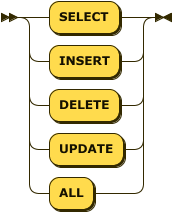
Use GRANT to give privileges to a user and REVOKE to remove previously granted privileges.
Basic examples:
-- Grant user1 SELECT privileges on mytable
GRANT SELECT ON mytable TO user1;

-- Grant user1 all privileges on mytable
GRANT ALL ON mytable TO user1;
-- Revoke UPDATE privilege on mytable granted to user1
REVOKE UPDATE ON mytable FROM user1;
-- Revoke all privileges on mytable granted to user1
REVOKE ALL ON mytable FROM user1;Table Privileges
Use the following target formats when you grant privileges on a table:
tableuser.tabledb.user.table
Available table privileges:
SELECTINSERTDELETEUPDATEALL
Examples:
GRANT SELECT ON sensor_log TO reader;
GRANT SELECT, INSERT ON sys.sensor_log TO writer;
REVOKE INSERT ON sys.sensor_log FROM writer;
GRANT ALL ON machbasedb.sys.sensor_log TO app_user;
Machbase 8.5+: Database Privileges
Note: The following behavior is supported from Machbase 8.5 or later.
From Machbase 8.5, you can grant database-scoped privileges by using MACHBASEDB as the target.
GRANT CREATE ON machbasedb TO ddl_user;
GRANT DROP ON machbasedb TO ddl_user;
GRANT ALTER ON machbasedb TO ops_user;
GRANT BACKUP ON machbasedb TO backup_user;
GRANT MOUNT ON machbasedb TO mount_user;
GRANT DDL ON machbasedb TO deploy_user;
GRANT ALL ON machbasedb TO admin_user;
Available database-scoped privileges:
CREATEDROPALTERMOUNTBACKUPDDLALL
Here, DDL means the combined CREATE + DROP privilege.
Meaning of ALL
Note: The following behavior is supported from Machbase 8.5 or later.
ALL does not always mean the same thing. Its meaning depends on the target.
GRANT ALL ON machbasedb TO user1- Grants the full set of database-scoped privileges.
GRANT ALL ON sys.table1 TO user1- Grants the full set of DML privileges on that table.
In other words, ALL on MACHBASEDB and ALL on a table use the same keyword, but they serve different purposes.
DML Privileges Cannot Be Granted Directly on MACHBASEDB
Note: The following behavior is supported from Machbase 8.5 or later.
You cannot directly grant SELECT, INSERT, DELETE, or UPDATE on the database name MACHBASEDB.
GRANT SELECT ON machbasedb TO user1;
GRANT INSERT ON machbasedb TO user1;
REVOKE DELETE ON machbasedb FROM user1;
REVOKE UPDATE ON machbasedb FROM user1;
These statements fail with:
[ERR-02186: Invalid database name.]To grant read or write access, specify a table instead.
GRANT SELECT ON sys.sensor_log TO user1;
GRANT INSERT ON sys.sensor_log TO user1;
Use MACHBASEDB as the Database Target
Note: The following behavior is supported from Machbase 8.5 or later.
Use MACHBASEDB when you grant database-scoped privileges.
GRANT BACKUP ON machbasedb TO backup_user;
REVOKE BACKUP ON machbasedb FROM backup_user;
If you use an invalid database name, the statement fails.
GRANT BACKUP ON typo TO backup_user;[ERR-02186: Invalid database name.]Operations That Require Database Privileges
Note: The following behavior is supported from Machbase 8.5 or later.
The following operations require database-scoped privileges on MACHBASEDB, not table-level privileges.
CREATE TABLE,DROP TABLECREATE VIEW,DROP VIEWCREATE INDEX,DROP INDEXCREATE ROLLUP,DROP ROLLUPCREATE TABLESPACE,DROP TABLESPACECREATE RETENTION,DROP RETENTIONALTER SYSTEMBACKUP DATABASEMOUNT DATABASE,UNMOUNT DATABASE
For example, if a normal user needs to run CREATE VIEW, grant CREATE on MACHBASEDB.
GRANT CREATE ON machbasedb TO user1;Default Privileges for a New User
When a new user is created, the following privileges are granted by default.
SELECTINSERTDELETEUPDATECREATEDROP
The following privileges are not included by default and must be granted explicitly when needed.
ALTERMOUNTBACKUP
Privileges Do Not Override Table-Type Restrictions
Even with privileges, the built-in restrictions of each table type still apply.
LOGandTAGtables do not supportUPDATE.VOLATILEandLOOKUPtables support all DML operations, butWHEREclauses for query, update, and delete operations must be based on the primary key.
In other words, granting privileges does not enable unsupported DML behavior.
Common Grant Examples
-- Allow read-only access to a specific table
GRANT SELECT ON sys.sensor_log TO reader;

-- Allow read and insert on a specific table
GRANT SELECT, INSERT ON sys.sensor_log TO writer;

-- Allow only DDL operations for a normal user
GRANT DDL ON machbasedb TO deploy_user;

-- Allow ALTER SYSTEM
GRANT ALTER ON machbasedb TO ops_user;

-- Allow backup
GRANT BACKUP ON machbasedb TO backup_user;

-- Allow mount and unmount
GRANT MOUNT ON machbasedb TO mount_user;
Managing User Example
Here is an example of the above query and its results.
############################################
## Connect with SYS account
############################################
Mach> create user demo identified by 'demo';
Created successfully.

Mach> drop user demo;
Dropped successfully.

Mach> create user demo1 identified by 'demo1';
Created successfully.

Mach> create user demo2 identified by 'demo2';
Created successfully.

Mach> alter user demo2 identified by 'demo22';
Altered successfully.

Mach> create table demo1_table (id integer);
Created successfully.

Mach> create bitmap index demo1_table_index1 on demo1_table(id);
Created successfully.

Mach> insert into demo1_table values(99991);
1 row(s) inserted.

Mach> insert into demo1_table values(99992);
1 row(s) inserted.

Mach> insert into demo1_table values(99993);
1 row(s) inserted.

Mach> select * from demo1_table;
ID
--------------
99993
99992
99991
[3] row(s) selected.

#Error: Can't drop the user connected.
Mach> drop user SYS;
[ERR-02083 : Drop user error. You cannot drop yourself(SYS).]

############################################
## Connect DEMO1
############################################
Mach> connect demo1/demo1;
Connected successfully.

#Error: can't alter other's account password
Mach> alter user demo2 identified by 'demo22';
[ERR-02085 : ALTER user error. The user(DEMO2) does not have ALTER privileges.]

Mach> alter user demo1 identified by demo11;
Altered successfully.

#Error: wrong password
Mach> connect demo1/demo11234;
[ERR-02081 : User authentication error. Invalid password (DEMO11234).]

## Correct password
Mach> connect demo1/demo11;
Connected successfully.

Mach> create table demo1_table (id integer);
Created successfully.

Mach> create bitmap index demo1_table_index1 on demo1_table(id);
Created successfully.

Mach> insert into demo1_table values(1);
1 row(s) inserted.

Mach> insert into demo1_table values(2);
1 row(s) inserted.

Mach> insert into demo1_table values(3);
1 row(s) inserted.

Mach> select * from demo1_table;
ID
--------------
3
2
1
[3] row(s) selected.

Mach> select * from demo1.demo1_table;
ID
--------------
3
2
1
[3] row(s) selected.

############################################
## Connect SYS again
############################################
Mach> connect SYS/MANAGER;
Connected successfully.

Mach> select * from demo1_table;
ID
--------------
99993
99992
99991
[3] row(s) selected.

Mach> select * from demo1.demo1_table;
ID
--------------
3
2
1
[3] row(s) selected.

Mach> drop user demo1;
[ERR-02084 : DROP user error. The user's tables still exist. Drop those tables first.]

Mach> connect demo1/demo11;
Connected successfully.

Mach> drop table demo1_table;
Dropped successfully.

Mach> connect SYS/MANAGER;
Connected successfully.

Mach> drop user demo1;
Dropped successfully.