Rollup Tables for Aggregation
Overview
Rollup tables provide automatic time-based aggregation of tag data, dramatically improving query performance for analytics and reporting. Instead of scanning millions of raw records, rollup tables pre-calculate statistics at different time intervals.
Time-Axis Feature Only
ROLLUP is available only for time-axis (BASETIME, BASE TIME) tag tables. The following features are not supported on distance-axis (BASE DISTANCE, BASEDISTANCE) tag tables.
WITH ROLLUP(...)CREATE ROLLUP ... ON <distance_tag> ...CREATE ROLLUP ... INTO (...) AS (...)
For example, the following statement fails.
CREATE TAG TABLE trip_rollup_test (
    name        VARCHAR(20) PRIMARY KEY,
    distance_m  DOUBLE BASE DISTANCE,
    value       DOUBLE SUMMARIZED
) WITH ROLLUP(SEC);

[ERR-04999: ROLLUP is not supported on DISTANCE axis TAG table.]
For distance-axis tables, use these patterns instead.
- Direct range queries with
BETWEEN a AND b - Bucket aggregation with
TRUNC(distance / bucket, 0) * bucket EXPLAINto verify that the distance predicate is used as a key range
Creating Rollup Tables
When user create tag table, Rollup does not created default, user must create by themselves. Syntax is as follow.
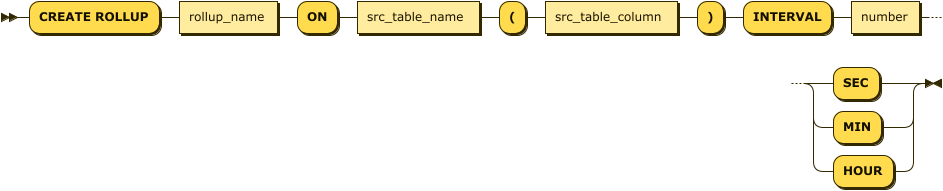
Public syntax:
CREATE ROLLUP [IF NOT EXISTS] rollup_name
  ON source_table(column_name)
  INTERVAL n (SEC|MIN|HOUR)
  [WAKEUP INTERVAL m (SEC|MIN|HOUR)]
  [EXTENSION]
  [WHERE predicate];

CREATE ROLLUP [IF NOT EXISTS] rollup_name
  ON source_table(json_column->'$.path')
  INTERVAL n (SEC|MIN|HOUR)
  [WAKEUP INTERVAL m (SEC|MIN|HOUR)]
  [WHERE predicate];

CREATE ROLLUP [IF NOT EXISTS] rollup_name
  FROM source_rollup_table
  INTERVAL n (SEC|MIN|HOUR)
  [WAKEUP INTERVAL m (SEC|MIN|HOUR)]
  [EXTENSION]
[WHERE predicate];- rollup name : rollup table’s name (Can be freely created with string up to 40)
- source table name : Name of source table which rollup will aggregate data.
- src_table_column : rollup target data column name
- Numeric columns are supported by default
JSON SUMMARIZEDis supported as a special mode that aggregates the whole JSON document forvalue.- If the source table is a rollup table, it is omitted and automatically designated as the rollup target column of the source table
- number sec/min/hour : time and time unit for aggregate
ex) 1 sec aggregate : 1 sec
ex) 30 seconds aggregate : 30 sec
ex) 1 minute aggregate : 1 min
ex) 1 hour aggregate : 1 hour - constraint
- Source table for aggregation can specify only tag table or rollup table
- If source table for aggregation is rollup table, time for rollup table must be bigger than time for source table. And it must be multiple.
Example for Creating rollup table
Mach> CREATE TAG TABLE tag (name VARCHAR(20) PRIMARY KEY, time DATETIME BASETIME, value DOUBLE, strvalue VARCHAR(20));
Executed successfully.

-- creating 1 second rollup for tag table
Mach> CREATE ROLLUP _tag_rollup_sec ON tag(value) INTERVAL 1 SEC;

-- creating 1 minute rollup for tag table
Mach> CREATE ROLLUP _tag_rollup_min ON tag(value) INTERVAL 1 MIN;

-- creating 1 hour rollup for tag table
Mach> CREATE ROLLUP _tag_rollup_hour ON tag(value) INTERVAL 1 HOUR;

-- creating 30 seconds rollup for tag table
Mach> CREATE ROLLUP _tag_rollup_30sec ON tag(value) INTERVAL 30 SEC;

-- creating 10 minutes rollup for roll up table above
Mach> CREATE ROLLUP _tag_rollup_10min ON _tag_rollup_30sec INTERVAL 10 MIN;

-- Error when creating rollup for non-numeric type columns
Mach> CREATE ROLLUP _tag_rollup_sec ON tag(strvalue) INTERVAL 1 SEC;
[ERR-02671: Invalid type for ROLLUP column (STRVALUE).]
Automatically create a ROLLUP table
A roll-up table can be automatically generated using the keyword with ROLLUP (time_unit)
CREATE TAG TABLE tagtbl (name VARCHAR(20) PRIMARY KEY, time DATETIME BASETIME, value DOUBLE SUMMARIZED) WITH ROLLUP (time_unit)

time_unit := {SEC|MIN|HOUR}
If the time_unit is not specified as below, it will proceed based on SEC.
CREATE TAG TABLE tagtbl (name VARCHAR(20) PRIMARY KEY, time DATETIME BASETIME, value DOUBLE SUMMARIZED) WITH ROLLUPThe name of the automatically generated rollup is generated in the following format. (tagtbl contains tag table name.)
- _
tagtbl_ROLLUP_SEC - _
tagtbl_ROLLUP_MIN - _
tagtbl_ROLLUP_HOUR
Mach> CREATE TAG TABLE tagtbl (name VARCHAR(20) PRIMARY KEY, time DATETIME BASETIME, value DOUBLE SUMMARIZED) WITH ROLLUP (SEC)

Mach> SHOW TABLES;
USER_NAME             DB_NAME                                             TABLE_NAME                                          TABLE_TYPE
-----------------------------------------------------------------------------------------------------------------------------------------------
SYS                   MACHBASEDB                                          TAGTBL                                              TAGDATA
SYS                   MACHBASEDB                                          _TAGTBL_DATA_0                                      KEYVALUE
SYS                   MACHBASEDB                                          _TAGTBL_DATA_1                                      KEYVALUE
SYS                   MACHBASEDB                                          _TAGTBL_DATA_2                                      KEYVALUE
SYS                   MACHBASEDB                                          _TAGTBL_DATA_3                                      KEYVALUE
SYS                   MACHBASEDB                                          _TAGTBL_META                                        LOOKUP
SYS                   MACHBASEDB                                          _TAGTBL_ROLLUP_HOUR                                 KEYVALUE
SYS                   MACHBASEDB                                          _TAGTBL_ROLLUP_MIN                                  KEYVALUE
SYS                   MACHBASEDB                                          _TAGTBL_ROLLUP_SEC                                  KEYVALUE
[9] row(s) selected.
Elapsed time: 0.001
Mach>
The criteria entered in time_unit are viewed as the smallest criteria and even the upper time unit is automatically generated.
When a rollup table name conflict occurs, all rollup table creation fails and only tag tables are generated.
When automatically generating a rollup, you can configure the rollup’s DATA_PART_SIZE in bytes.
CREATE TAG TABLE tagtbl (name VARCHAR(20) PRIMARY KEY, time DATETIME BASETIME, value DOUBLE SUMMARIZED) WITH ROLLUP ROLLUP_DATA_PART_SIZE=(data_part_size)Extended ROLLUP
By adding the EXTENSION keyword at the end of the syntax for creating Rollup tables, you can create an extended Rollup. An extended Rollup includes both the starting and ending values of the specified interval.
-- Manually create an Extended Rollup table
CREATE ROLLUP _tag_rollup_sec ON tag(value) INTERVAL 1 SEC EXTENSION;

-- Automatically generate Extended Rollup tables
CREATE TAG TABLE tagtbl (name VARCHAR(20) PRIMARY KEY, time DATETIME BASETIME, value DOUBLE SUMMARIZED) WITH ROLLUP EXTENSION;
Conditional Rollups, Filters, and Hints
What this feature solves
When multiple rollups share the same interval, value column, and JSON path, the engine now distinguishes between “plain” rollups and “filtered” rollups. It automatically prefers the unfiltered one, yet lets you force a specific rollup with a hint. Filters are validated at creation time to prevent confusing or unsafe definitions.
How to create a filtered rollup
CREATE ROLLUP <rollup_name>
  ( ON <table_name>(<value_col>)
  | FROM <src_rollup_table_name> )
  INTERVAL <n> <SEC|MIN|HOUR>
WHERE <predicate>;- The predicate is applied to source rows before aggregation; predicate columns are not stored in the rollup table.
- Allowed: regular scalar expressions (AND/OR/NOT, comparison, BETWEEN, IN, LIKE, CASE, non-aggregate functions) that reference existing columns, including non‑summarized columns such as
value2orstatus. - Not allowed: subqueries, aggregate functions, unknown columns, or the tag-name (PK) column of a tag table (it is internally numeric, so string comparison is meaningless).
- Validation happens during
CREATE ROLLUP; invalid predicates fail fast with an error.
WHERE in conditional rollup vs custom rollup
- Conditional rollup uses an external
WHEREwith theON/FROMsyntax. - Custom Rollup (
INTO ... AS (SELECT ...)) supportsWHEREonly inside theSELECT. - Therefore,
CREATE ROLLUP ... INTO (...) AS (...) INTERVAL ... WHERE ...is not valid. - See Custom Rollup: User-Defined Aggregation and DDL: CREATE ROLLUP for the full syntax.
Automatic selection order (no hint)
- If a
ROLLUP_TABLE(<rollup_table_name>)hint exists, it always wins. - Otherwise, among rollups that match interval/value/JSON path, one without a predicate is chosen first.
- If no plain rollup exists, a predicate rollup is used.
- If multiple candidates remain, the existing rule is kept: pick the largest frequency that divides the requested interval; for equal frequencies, the first registered rollup stays selected.
Quick recipe (mirrors the regression scenario)
- Create a tag table with extra columns you want to filter on, for example
value2 DOUBLE,status INTEGERin addition to the summarizedvalue. - Create both plain and filtered rollups:
CREATE ROLLUP _tag_rollup_plain_1s      ON tag_bulk(value) INTERVAL 1 SEC;
CREATE ROLLUP _tag_rollup_plain_1m      FROM _tag_rollup_plain_1s INTERVAL 1 MIN;
CREATE ROLLUP _tag_rollup_cond_1s       ON tag_bulk(value) INTERVAL 1 SEC
  WHERE value2 >= 50 AND status >= 2;
CREATE ROLLUP _tag_rollup_cond_1m       FROM _tag_rollup_cond_1s INTERVAL 1 MIN;

-- Extended rollups for FIRST()/LAST()
CREATE ROLLUP _tag_rollup_plain_1s_ext  ON tag_bulk(value) INTERVAL 1 SEC EXTENSION;
CREATE ROLLUP _tag_rollup_cond_1s_ext   ON tag_bulk(value) INTERVAL 1 SEC EXTENSION
WHERE value2 >= 50 AND status >= 2;- Load data (bulk loader or INSERT), then flush to make aggregates available:
EXEC ROLLUP_FORCE(_TAG_BULK_ROLLUP_SEC);   -- auto rollup from WITH ROLLUP
EXEC ROLLUP_FORCE(_tag_rollup_plain_1s);
EXEC ROLLUP_FORCE(_tag_rollup_cond_1s);- Query without a hint (uses the plain rollup automatically):
SELECT rollup('sec', 30, time) AS rt, AVG(value), COUNT(value)
FROM   tag_bulk
WHERE  name = 'dev9' AND time BETWEEN '2020-01-02 00:00:00' AND '2020-01-02 00:10:00'
GROUP BY rt
ORDER BY rt;- Force a filtered rollup when you must honor the predicate:
SELECT /*+ ROLLUP_TABLE(_tag_rollup_cond_1s) */
       rollup('sec', 30, time) AS rt, AVG(value), COUNT(value)
FROM   tag_bulk
WHERE  name = 'dev9' AND time BETWEEN '2020-01-02 00:00:00' AND '2020-01-02 00:10:00'
GROUP BY rt
ORDER BY rt;- Using FIRST()/LAST()? Point the hint to an
EXTENSIONrollup; the functions are not available on non-extension rollups.
Metadata and upgrade notes
V$ROLLUPnow shows aPREDICATEcolumn so you can confirm which filter a rollup was created with.- The meta version is bumped to 10.0 to add this column. On first server start after upgrade, the catalog is altered automatically. If the upgrade fails (for example on a very old or corrupted meta), stop the server, create a fresh database, and recreate rollups.
- Rollup creation still enforces the existing rules on intervals and value types; filters do not change those constraints.
Start/Stop Rollup Table
When a rollup is created its worker thread starts automatically. You can toggle it later with either the stored procedures or the SQL syntax.
-- Start/stop a rollup
ALTER ROLLUP <rollup_name> START;
ALTER ROLLUP <rollup_name> STOP;

-- Equivalent procedures
EXEC ROLLUP_START(<rollup_name>);
EXEC ROLLUP_STOP(<rollup_name>);
Wakeup interval and scheduling
- Each rollup wakes up on its own schedule. By default the wakeup interval equals the rollup interval, but you can tighten it to run more frequently (while still aligned to the rollup boundary).
- Syntax to change the wakeup interval:
ALTER ROLLUP <rollup_name> SET WAKEUP INTERVAL <N> (SEC|MIN|HOUR);Nmust be > 0.Nconverted to seconds must be no larger than the rollup interval.- The rollup interval must be an exact multiple of the wakeup interval; otherwise an error is raised.
- When changed, the thread wakes immediately and reschedules the next wakeup.
- Observability:
V$ROLLUPnow exposesWAKEUP_INTERVAL,LAST_WAKEUP_TIME,NEXT_WAKEUP_TIME, andRUN_STATE(INIT/SLEEPING/RUNNING).show rollupgapalso shows the last/next wakeup and run state.
Collect Rollup Instantly
rollup basically aggregate data in set time unit.
- ex) If it is 1 hour rollup, it aggregate data once in hour and rest in rest time. User can aggregate data in force.
-- Non-blocking: just wake the thread now, then return
ALTER ROLLUP <rollup_name> WAKEUP;

-- Blocking: run rollup immediately and wait for completion
ALTER ROLLUP <rollup_name> FORCE;
-- Equivalent procedure
EXEC ROLLUP_FORCE(<rollup_name>);
Rollup Rebuild Reference
Deleting raw TAG data or reloading corrected rows does not automatically rewind existing rollup results.
For built-in time-range recovery, EXEC ROLLUP_REBUILD(...), and manual custom rollup recovery steps, see Rollup Rebuild Guide.
Drop Rollup
Drop Rollup.
DROP ROLLUP rollup_name- rollup_name : Name of rollup
- constraint: if there is an rollup table that reference rollup table that will be deleted as source tree, it will cause error. User must delete it in reverse order.
mach> create tag table tag (name varchar(20) primary key, time datetime basetime, value double summarized);
mach> create rollup _tag_rollup_1 on tag(value) interval 1 sec;
mach> create rollup _tag_rollup_2 on _tag_rollup_1 interval 1 min;
mach> create rollup _tag_rollup_3 on _tag_rollup_2 interval 1 hour;

When created as above, the reference order is as follows.

tag -> _tag_rollup_1 -> _tag_rollup_2 -> _tag_rollup_3

At this time, if you try to delete the tag table or rollup in the middle, an error occurs.

mach> drop rollup tag
> [ERR-02651: Dependent ROLLUP table exists.]
mach> drop rollup _tag_rollup_1
> [ERR-02651: Dependent ROLLUP table exists.]

User must delete them in the following order to delete them normally.

mach> drop rollup _tag_rollup_3;
mach> drop rollup _tag_rollup_2;
mach> drop rollup _tag_rollup_1;
mach> drop table tag;
When deleting the TAG table, delete the ROLLUP table together
When deleting a tag table using the CASCADE keyword, you can also delete a roll-up table that is dependent on the tag table.
DROP TABLE TAG CASCADE;Mach> SHOW TABLES;
USER_NAME DB_NAME TABLE_NAME TABLE_TYPE
-----------------------------------------------------------------------------------------------------------------------------------------------
SYS MACHBASEDB TAGTBL TAGDATA
SYS MACHBASEDB _TAGTBL_DATA_0 KEYVALUE
SYS MACHBASEDB _TAGTBL_DATA_1 KEYVALUE
SYS MACHBASEDB _TAGTBL_DATA_2 KEYVALUE
SYS MACHBASEDB _TAGTBL_DATA_3 KEYVALUE
SYS MACHBASEDB _TAGTBL_META LOOKUP
SYS MACHBASEDB _TAGTBL_ROLLUP_HOUR KEYVALUE
SYS MACHBASEDB _TAGTBL_ROLLUP_MIN KEYVALUE
SYS MACHBASEDB _TAGTBL_ROLLUP_SEC KEYVALUE
[9] row(s) selected.
Elapsed time: 0.001
Mach>
Mach> DROP TABLE tagtbl CASCADE;
Dropped successfully.
Mach> show tables;
USER_NAME DB_NAME TABLE_NAME TABLE_TYPE
-----------------------------------------------------------------------------------------------------------------------------------------------
[0] row(s) selected.Syntax
rollup_expr := ROLLUP(time_unit, period, basetime_column [, origin])

--ex)
SELECT ROLLUP('MIN', 30, time, '1970-01-01'), MIN(value), MAX(value), AVG(value) FROM tag ..
If you use the ROLLUP keyword as above, the records are fetched from an appropriate rollup table.
- time_unit: Any time unit available in the DATE_BIN() function can be used. (see below)
- period: DATE_BIN() can specify a range for each unit of time available. (see below)
- basetime_column: Datetime column of the TAG table specified by the BASETIME attribute
- origin: The origin time to bin the ROLLUP time interval. If not specified, it is set to ‘1970-01-01’ by default.
Deprecated (version <= 8.0.19)
In version 8.0.19 and below, use the following ROLLUP expression.rollup_expr := basetime_column ROLLUP n time_unit -- ex) SELECT time ROLLUP 30 MIN, MIN(value), MAX(value), AVG(value) FROM tag ..
As above, if the ROLLUP clause is appended after the Datetime type column specified as the BASETIME attribute, the rollup table is selected.
Depending on the selection of TIME_UNIT, the searched rollup table is different.
| unit of time(Abbreviation) | rollup table |
|---|---|
| nanosecond (nsec) | SECOND |
| microsecond (usec) | SECOND |
| milisecond (msec) | SECOND |
| second (sec) | SECOND |
| minute (min) | MINUTE |
| hour | HOUR |
| day | HOUR |
| week | HOUR |
| month | HOUR |
| year | HOUR |
Since using the ROLLUP clause directly performs a rollup table lookup, to use an aggregate function, it has the following characteristics.
- The aggregate function must be called on the numeric type column. However, only the six aggregate functions (SUM, COUNT, MIN, MAX, AVG, SUMSQ) supported by the rollup table are supported.
- In the case of Extended Rollup, (FIRST, LAST) is additionally supported.
- GROUP BY must be done directly with the BASETIME column to be ROLLUP.
- You can use the ROLLUP clause with the same meaning as it is.
- Alternatively, an alias may be attached to the ROLLUP clause, and the alias may be written in GROUP BY.
SELECT   rollup('sec', 3, time) mtime, avg(value)
FROM     TAG
GROUP BY mtime;

-- deprecated
SELECT   time rollup 3 sec mtime, avg(value)
FROM     TAG
GROUP BY time rollup 3 sec mtime;

-- or
SELECT   time rollup 3 sec mtime, avg(value)
FROM     TAG
GROUP BY mtime;
Data Sample
Below is sample data for rollup test.
create tag table TAG (name varchar(20) primary key, time datetime basetime, value double summarized) with rollup extension;

insert into tag metadata values ('TAG_0001');

insert into tag values('TAG_0001', '2018-01-01 01:00:01 000:000:000', 1);
insert into tag values('TAG_0001', '2018-01-01 01:00:02 000:000:000', 2);
insert into tag values('TAG_0001', '2018-01-01 01:01:01 000:000:000', 3);
insert into tag values('TAG_0001', '2018-01-01 01:01:02 000:000:000', 4);
insert into tag values('TAG_0001', '2018-01-01 01:02:01 000:000:000', 5);
insert into tag values('TAG_0001', '2018-01-01 01:02:02 000:000:000', 6);

insert into tag values('TAG_0001', '2018-01-01 02:00:01 000:000:000', 1);
insert into tag values('TAG_0001', '2018-01-01 02:00:02 000:000:000', 2);
insert into tag values('TAG_0001', '2018-01-01 02:01:01 000:000:000', 3);
insert into tag values('TAG_0001', '2018-01-01 02:01:02 000:000:000', 4);
insert into tag values('TAG_0001', '2018-01-01 02:02:01 000:000:000', 5);
insert into tag values('TAG_0001', '2018-01-01 02:02:02 000:000:000', 6);

insert into tag values('TAG_0001', '2018-01-01 03:00:01 000:000:000', 1);
insert into tag values('TAG_0001', '2018-01-01 03:00:02 000:000:000', 2);
insert into tag values('TAG_0001', '2018-01-01 03:01:01 000:000:000', 3);
insert into tag values('TAG_0001', '2018-01-01 03:01:02 000:000:000', 4);
insert into tag values('TAG_0001', '2018-01-01 03:02:01 000:000:000', 5);
insert into tag values('TAG_0001', '2018-01-01 03:02:02 000:000:000', 6);
For one tag, different values in seconds were input for 3 hours.
Get ROLLUP AVG
Below is the case of getting average of seconds, minutes, hours of tag table.
Mach> SELECT rollup('sec', 1, time) as mtime, avg(value) FROM TAG WHERE name = 'TAG_0001' group by mtime order by mtime;
mtime                           avg(value)
---------------------------------------------------------------
2018-01-01 01:00:01 000:000:000 1
2018-01-01 01:00:02 000:000:000 2
2018-01-01 01:01:01 000:000:000 3
2018-01-01 01:01:02 000:000:000 4
2018-01-01 01:02:01 000:000:000 5
2018-01-01 01:02:02 000:000:000 6
2018-01-01 02:00:01 000:000:000 1
2018-01-01 02:00:02 000:000:000 2
2018-01-01 02:01:01 000:000:000 3
2018-01-01 02:01:02 000:000:000 4
2018-01-01 02:02:01 000:000:000 5
2018-01-01 02:02:02 000:000:000 6
2018-01-01 03:00:01 000:000:000 1
2018-01-01 03:00:02 000:000:000 2
2018-01-01 03:01:01 000:000:000 3
2018-01-01 03:01:02 000:000:000 4
2018-01-01 03:02:01 000:000:000 5
2018-01-01 03:02:02 000:000:000 6
[18] row(s) selected.

Mach> SELECT rollup('min', 1, time) as mtime, avg(value) FROM TAG WHERE name = 'TAG_0001' group by mtime order by mtime;
mtime                           avg(value)
---------------------------------------------------------------
2018-01-01 01:00:00 000:000:000 1.5
2018-01-01 01:01:00 000:000:000 3.5
2018-01-01 01:02:00 000:000:000 5.5
2018-01-01 02:00:00 000:000:000 1.5
2018-01-01 02:01:00 000:000:000 3.5
2018-01-01 02:02:00 000:000:000 5.5
2018-01-01 03:00:00 000:000:000 1.5
2018-01-01 03:01:00 000:000:000 3.5
2018-01-01 03:02:00 000:000:000 5.5
[9] row(s) selected.

Mach> SELECT rollup('hour', 1, time) as mtime, avg(value) FROM TAG WHERE name = 'TAG_0001' group by mtime order by mtime;
mtime                           avg(value)
---------------------------------------------------------------
2018-01-01 01:00:00 000:000:000 3.5
2018-01-01 02:00:00 000:000:000 3.5
2018-01-01 03:00:00 000:000:000 3.5
[3] row(s) selected.
Get ROLLUP MIN/MAX Value
Below is the case of getting min/max value of seconds, minutes, hours of tag table. The difference between others, you can get minimum value and maximum value at the same time with just one query.
Mach> SELECT rollup('hour', 1, time) as mtime, min(value), max(value) FROM TAG WHERE name = 'TAG_0001' group by mtime order by mtime;
mtime                           min(value)                  max(value)
--------------------------------------------------------------------------------------------
2018-01-01 01:00:00 000:000:000 1                           6
2018-01-01 02:00:00 000:000:000 1                           6
2018-01-01 03:00:00 000:000:000 1                           6
[3] row(s) selected.

Mach> SELECT rollup('min', 1, time) as mtime, min(value), max(value) FROM TAG WHERE name = 'TAG_0001' group by mtime order by mtime;
mtime                           min(value)                  max(value)
--------------------------------------------------------------------------------------------
2018-01-01 01:00:00 000:000:000 1                           2
2018-01-01 01:01:00 000:000:000 3                           4
2018-01-01 01:02:00 000:000:000 5                           6
2018-01-01 02:00:00 000:000:000 1                           2
2018-01-01 02:01:00 000:000:000 3                           4
2018-01-01 02:02:00 000:000:000 5                           6
2018-01-01 03:00:00 000:000:000 1                           2
2018-01-01 03:01:00 000:000:000 3                           4
2018-01-01 03:02:00 000:000:000 5                           6
[9] row(s) selected.
Get ROLLUP SUM/COUNT
Below is the case of getting sum/count value. Also you can get sum value and count value at the same time with just one query.
Mach> SELECT rollup('min', 1, time) as mtime, sum(value), count(value) FROM TAG WHERE name = 'TAG_0001' group by mtime order by mtime;
mtime                           sum(value)                  count(value)
-------------------------------------------------------------------------------------
2018-01-01 01:00:00 000:000:000 3                           2
2018-01-01 01:01:00 000:000:000 7                           2
2018-01-01 01:02:00 000:000:000 11                          2
2018-01-01 02:00:00 000:000:000 3                           2
2018-01-01 02:01:00 000:000:000 7                           2
2018-01-01 02:02:00 000:000:000 11                          2
2018-01-01 03:00:00 000:000:000 3                           2
2018-01-01 03:01:00 000:000:000 7                           2
2018-01-01 03:02:00 000:000:000 11                          2
[9] row(s) selected.
Get ROLLUP Sum of Squares
Below is the case of getting sum of squares in rollup.
Mach> SELECT rollup('sec', 1, time) as mtime, SUMSQ(value) FROM tag GROUP BY mtime ORDER BY mtime;
mtime                           SUMSQ(value)
---------------------------------------------------------------
2018-01-01 01:00:01 000:000:000 1
2018-01-01 01:00:02 000:000:000 4
2018-01-01 01:01:01 000:000:000 9
2018-01-01 01:01:02 000:000:000 16
2018-01-01 01:02:01 000:000:000 25
2018-01-01 01:02:02 000:000:000 36
2018-01-01 02:00:01 000:000:000 1
2018-01-01 02:00:02 000:000:000 4
2018-01-01 02:01:01 000:000:000 9
2018-01-01 02:01:02 000:000:000 16
2018-01-01 02:02:01 000:000:000 25
2018-01-01 02:02:02 000:000:000 36
2018-01-01 03:00:01 000:000:000 1
2018-01-01 03:00:02 000:000:000 4
2018-01-01 03:01:01 000:000:000 9
2018-01-01 03:01:02 000:000:000 16
2018-01-01 03:02:01 000:000:000 25
2018-01-01 03:02:02 000:000:000 36
[18] row(s) selected.

Mach> SELECT rollup('min', 1, time) as mtime, SUMSQ(value) FROM tag GROUP BY mtime ORDER BY mtime;
mtime                           SUMSQ(value)
---------------------------------------------------------------
2018-01-01 01:00:00 000:000:000 5
2018-01-01 01:01:00 000:000:000 25
2018-01-01 01:02:00 000:000:000 61
2018-01-01 02:00:00 000:000:000 5
2018-01-01 02:01:00 000:000:000 25
2018-01-01 02:02:00 000:000:000 61
2018-01-01 03:00:00 000:000:000 5
2018-01-01 03:01:00 000:000:000 25
2018-01-01 03:02:00 000:000:000 61
[9] row(s) selected.
ROLLUP for JSON SUMMARIZED
With value JSON SUMMARIZED, you can run ROLLUP aggregation on the full value document without defining separate JSON paths.
This is useful when one JSON document contains multiple numeric leaves such as metrics, coordinates, or counters. The result keeps the object shape and aggregates only numeric leaves.
Supported Scope
- DDL:
value JSON SUMMARIZED - Aggregates:
AVG(value),MIN(value),MAX(value),SUM(value),SUMSQ(value) - Counts:
COUNT(value),COUNT(*) FIRST(time, value)andLAST(time, value)are available only onEXTENSIONrollups.
Representative Examples
-- Aggregate the full JSON document with the default rollup
CREATE TAG TABLE tag_json_rollup (
    name  VARCHAR(20) PRIMARY KEY,
    time  DATETIME BASETIME,
    value JSON SUMMARIZED
) WITH ROLLUP;

INSERT INTO tag_json_rollup VALUES ('HVAC_A', '2026-04-07 12:00:00', '{"metrics":{"temp":20,"pressure":1000},"location":{"x":6},"status":"ok"}');
INSERT INTO tag_json_rollup VALUES ('HVAC_A', '2026-04-07 12:00:01', '{"metrics":{"temp":22,"pressure":1002},"location":{"x":8},"status":true}');
INSERT INTO tag_json_rollup VALUES ('HVAC_A', '2026-04-07 12:00:02', '{"metrics":{"temp":24,"pressure":1004},"location":{"x":10},"status":null}');
-- If needed, use ROLLUP_FORCE or WAKEUP to collect immediately

SELECT rollup('hour', 1, time) AS mtime,
       COUNT(value), MIN(value), MAX(value), AVG(value), SUM(value), SUMSQ(value)
  FROM tag_json_rollup
 WHERE name = 'HVAC_A'
 GROUP BY mtime
 ORDER BY mtime;
-- Aggregate only numeric leaves when strings, booleans, and nulls are mixed in
CREATE TAG TABLE tag_json_mix (
name VARCHAR(20) PRIMARY KEY,
time DATETIME BASETIME,
value JSON SUMMARIZED
) WITH ROLLUP TAG_PARTITION_COUNT=1;
INSERT INTO tag_json_mix VALUES ('HVAC_B', '2026-04-07 13:00:00', '{"metrics":{"temp":10,"pressure":100},"location":{"x":1},"mode":"AUTO","enabled":false}');
INSERT INTO tag_json_mix VALUES ('HVAC_B', '2026-04-07 13:00:01', '{"metrics":{"temp":20,"pressure":200},"location":{"x":2},"mode":"MANUAL","enabled":true}');
INSERT INTO tag_json_mix VALUES ('HVAC_B', '2026-04-07 13:00:02', '{"metrics":{"temp":30,"pressure":300},"location":{"x":3},"mode":null,"enabled":null}');
-- If needed, use ROLLUP_FORCE or WAKEUP to collect immediately
SELECT rollup('hour', 1, time) AS mtime, COUNT(value), COUNT(*), AVG(value), MIN(value), MAX(value), SUM(value)
FROM tag_json_mix
GROUP BY mtime
ORDER BY mtime;-- Arrays are not flattened, and FIRST/LAST requires an EXTENSION rollup
CREATE TAG TABLE tag_json_mix2 (
name VARCHAR(20) PRIMARY KEY,
time DATETIME BASETIME,
value JSON SUMMARIZED
) WITH ROLLUP EXTENSION TAG_PARTITION_COUNT=1;
INSERT INTO tag_json_mix2 VALUES ('HVAC_C', '2026-04-07 14:00:00', '{"metrics":{"temp":1,"pressure":10}, "location":{"x":1}, "history":[1,2,3]}');
INSERT INTO tag_json_mix2 VALUES ('HVAC_C', '2026-04-07 14:00:01', '{"metrics":{"temp":3,"pressure":30}, "location":{"x":2}, "history":[4,5]}');
INSERT INTO tag_json_mix2 VALUES ('HVAC_C', '2026-04-07 14:00:02', '{"metrics":{"temp":5,"pressure":50}, "location":{"x":3}, "history":[6]}');
-- If needed, use ROLLUP_FORCE or WAKEUP to collect immediately
SELECT rollup('hour', 1, time) AS mtime,
COUNT(value),
AVG(value),
SUM(value),
FIRST(time, value),
LAST(time, value)
FROM tag_json_mix2
GROUP BY mtime
ORDER BY mtime;-- Build a RAW -> SEC -> MIN -> HOUR chain
CREATE TAG TABLE tag_json_chain (
name VARCHAR(20) PRIMARY KEY,
time DATETIME BASETIME,
value JSON SUMMARIZED
);
CREATE ROLLUP _tag_json_chain_sec ON tag_json_chain(value) INTERVAL 1 SEC;
CREATE ROLLUP _tag_json_chain_min ON _tag_json_chain_sec INTERVAL 1 MIN;
CREATE ROLLUP _tag_json_chain_hour ON _tag_json_chain_min INTERVAL 1 HOUR;SELECT rollup('hour', 1, time) AS mtime, COUNT(value), AVG(value), SUMSQ(value)
FROM tag_json_chain
GROUP BY mtime
ORDER BY mtime;Malformed JSON is rejected at insert time, so it never participates in rollup aggregation.
-- Invalid JSON is not inserted and therefore not aggregated
CREATE TAG TABLE tag_json_bad (
    name  VARCHAR(20) PRIMARY KEY,
    time  DATETIME BASETIME,
    value JSON SUMMARIZED
) WITH ROLLUP;

INSERT INTO tag_json_bad VALUES ('HVAC_D', '2026-04-07 15:00:00', '{"metrics":{"temp":1,"pressure":2},"location":{"x":1}}');
INSERT INTO tag_json_bad VALUES ('HVAC_D', '2026-04-07 15:00:01', '{"metrics":{"temp":1,"pressure":2},"location":{"x":1}');
-- Rows rejected at insert time are excluded from aggregation

SELECT rollup('hour', 1, time) AS mtime, COUNT(value), SUMSQ(value)
  FROM tag_json_bad
 GROUP BY mtime
 ORDER BY mtime;
Behavior Rules
- Objects are merged recursively while preserving path union.
- Only numeric leaves are aggregated.
- Strings, booleans, nulls, and arrays are excluded from numeric aggregation; arrays are not flattened.
- Missing paths are not created in the output object.
- For duplicated keys on the same path, the last value after parser normalization is kept.
COUNT(value)counts non-nullvaluerows;COUNT(*)counts all rows.
What to Check
- Verify shape retention and numeric-leaf aggregation for
rollup('sec'|'min'|'hour', ...). - Check
COUNT(value)andCOUNT(*)independently. - Ensure
FIRST/LASTis used only onEXTENSIONrollups. - Because
FIRST/LASTreturns the full original JSON document, consider network and payload size.
Get ROLLUP FIRST/LAST
Below is an example of obtaining the start and end values provided by Extended Rollup.
Mach> SELECT rollup('min', 1, time) as mtime, FIRST(time, value), LAST(time, value) FROM tag GROUP BY mtime ORDER BY mtime;
mtime                           FIRST(time, value)          LAST(time, value)
--------------------------------------------------------------------------------------------
2018-01-01 01:00:00 000:000:000 1                           2
2018-01-01 01:01:00 000:000:000 3                           4
2018-01-01 01:02:00 000:000:000 5                           6
2018-01-01 02:00:00 000:000:000 1                           2
2018-01-01 02:01:00 000:000:000 3                           4
2018-01-01 02:02:00 000:000:000 5                           6
2018-01-01 03:00:00 000:000:000 1                           2
2018-01-01 03:01:00 000:000:000 3                           4
2018-01-01 03:02:00 000:000:000 5                           6
[9] row(s) selected.

Mach> SELECT rollup('hour', 1, time) as mtime, FIRST(time, value), LAST(time, value) FROM tag GROUP BY mtime ORDER BY mtime;
mtime                           FIRST(time, value)          LAST(time, value)
--------------------------------------------------------------------------------------------
2018-01-01 01:00:00 000:000:000 1                           6
2018-01-01 02:00:00 000:000:000 1                           6
2018-01-01 03:00:00 000:000:000 1                           6
[3] row(s) selected.
Grouping at Various Time Intervals
The advantage of the ROLLUP clause is that it is not necessary to intentionally use DATE_BIN() to vary the time interval.
To get the sum of the 3-second interval and the number of data, you can do as follows. Since the example time range is only 0 sec, 1 sec, and 2 sec, it can be seen that they all converge to 0 sec. As a result, it matches the ‘rollup by minute’ query result.
Mach> SELECT rollup('sec', 3, time) as mtime, sum(value), count(value) FROM TAG WHERE name = 'TAG_0001' GROUP BY mtime ORDER BY mtime;
mtime                           sum(value)                  count(value)
-------------------------------------------------------------------------------------
2018-01-01 01:00:00 000:000:000 3                           2
2018-01-01 01:01:00 000:000:000 7                           2
2018-01-01 01:02:00 000:000:000 11                          2
2018-01-01 02:00:00 000:000:000 3                           2
2018-01-01 02:01:00 000:000:000 7                           2
2018-01-01 02:02:00 000:000:000 11                          2
2018-01-01 03:00:00 000:000:000 3                           2
2018-01-01 03:01:00 000:000:000 7                           2
2018-01-01 03:02:00 000:000:000 11                          2
Rollup of more than 1 day
Day Rollup
Mach> SELECT ROLLUP('day', 10, time, '2023-01-01') AS mtime, COUNT(value) FROM tag WHERE time BETWEEN TO_DATE('2023-05-01') AND TO_DATE('2023-05-31') GROUP BY mtime ORDER BY mtime;
mtime                           COUNT(value)
--------------------------------------------------------
2023-05-01 00:00:00 000:000:000 10
2023-05-11 00:00:00 000:000:000 10
2023-05-21 00:00:00 000:000:000 10
2023-05-31 00:00:00 000:000:000 1
[4] row(s) selected.
Week Rollup
If origin is not specified, it is counted in the range (Thursday-Wednesday). If you want to aggregate in the range (Sunday-Saturday), you must specify the datetime corresponding to Sunday in origin.
Month Rollup
origin should always be specified as the first day of the month (1st day).
Mach> SELECT ROLLUP('month', 2, time) AS mtime, COUNT(value) FROM tag WHERE time BETWEEN to_date('2024-05-01') AND to_date('2024-07-31') GROUP BY mtime ORDER BY mtime;
mtime                           COUNT(value)
--------------------------------------------------------
2024-05-01 00:00:00 000:000:000 61
2024-07-01 00:00:00 000:000:000 31
[2] row(s) selected.
Mach> SELECT ROLLUP('month', 1, time, '2024-05-05') AS mtime, COUNT(value) FROM tag WHERE time BETWEEN to_date('2024-05-01') AND to_date('2024-07-31') GROUP BY mtime ORDER BY mtime;
mtime                           COUNT(value)
--------------------------------------------------------
[ERR-02356: Origin must be the first day of the month.]
Year Rollup
Mach> SELECT ROLLUP('year', 1, time, '2022-01-01') AS mtime, COUNT(value) FROM tag WHERE time BETWEEN TO_DATE('2022-01-01') AND TO_DATE('2023-12-31') GROUP BY mtime ORDER BY mtime;
mtime                           COUNT(value)
--------------------------------------------------------
2022-01-01 00:00:00 000:000:000 365
2023-01-01 00:00:00 000:000:000 365
[2] row(s) selected.