JSH
JSH is currently in beta. Its API and commands are subject to change in future releases.
JSH allows you to write JavaScript applications for Machbase Neo.
Machbase Neo recognizes both standalone files with the .js extension and directories that contain an
index.js entry file as executable JSH applications.
Commands
exitends the current JSH session.lsshows the file list in the current working directory.cdchanges the working directory or moves to/work.
For the full command set, see the Command Reference document.
Pipe and Redirection
JSH supports shell-style pipe and redirection operators for external commands.
cmd1 | cmd2sends the standard output ofcmd1to the standard input ofcmd2.< fileredirects a file to standard input.> filewrites standard output to a file and overwrites it.>> fileappends standard output to a file.2> filewrites standard error to a file and overwrites it.2>> fileappends standard error to a file.2>&1merges standard error into standard output.
Examples:
 cat sample.txt | wc -l
 sort < input.txt > output.txt
 write-stderr boom 1 2> error.log
 write-stderr boom 0 2>&1 | wc -l
Notes:
- Pipe and redirection operators are parsed only outside quoted strings. For example,
echo "a | b"treats|as plain text. - In a pipeline, input redirection is supported only on the first stage and output redirection only on the last stage.
- Built-in internal commands such as
cd,ls, andexitdo not support redirection, and they cannot be used in pipelines.
Hello World Example
Copy the following code and save it as hello.js.
console.print("Hello World?\n")Select “JSH” from the “New…” page.
It works as a simple command-line interpreter for running .js files.
To run the saved script, enter the following command:
/work > ./hello.js
Hello World? 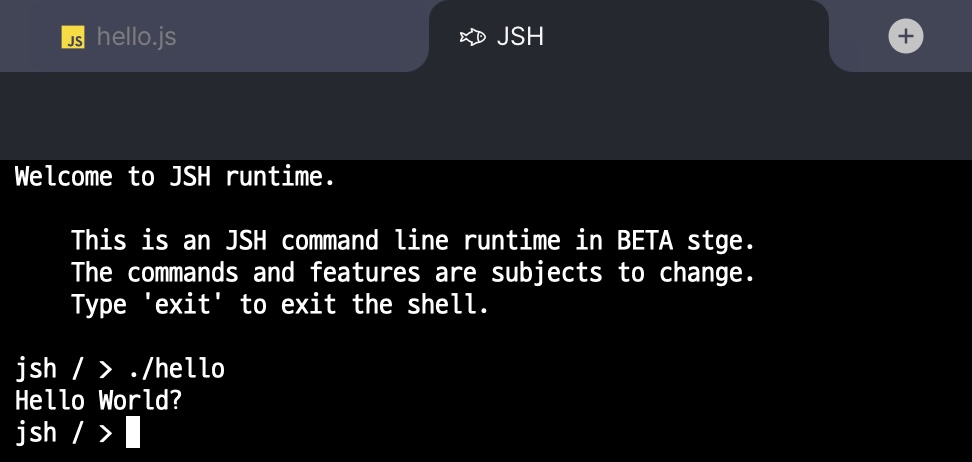
Directory Mounting
The JSH runtime environment uses a virtual file system that is isolated from the host OS file system.
If you run JSH and execute ls -l / inside it, you can see that JSH has its own directory tree,
which is different from the directory structure of the host operating system.
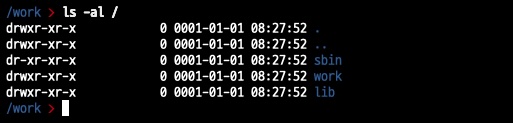
Among these default directories, /sbin and /lib contain read-only files built into JSH.
The /work directory is automatically mounted to the current OS directory, or to the directory shown in the file explorer in the web environment, unless another directory is specified when JSH starts.
To mount an arbitrary directory, use the -v <mount_point>=<os_dir> option.
For example, to mount the OS directory /var/tmp as /tmp in JSH, run the following command.
$ machbase-neo jsh -v /tmp=/var/tmp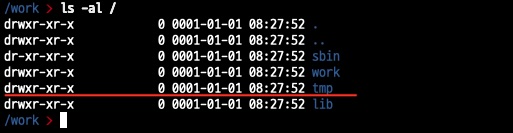
External Execution
You can run a JavaScript application you wrote outside the machbase-neo server process,
as long as the machbase-neo executable is available.
When you run machbase-neo jsh, the JSH interpreter executes the given script.
With this approach, you can build database query/insert applications using only the machbase-neo executable,
without additional tools.
Use the -C <code> option when you want to run a short JavaScript snippet directly from the command line,
without creating a separate script file.
$ /path/to/the/machbase-neo jsh -C 'console.println("Hello World?")'
Hello World?
To run a saved script without mounting a local directory, pass the script path with the
-C @<script_path> form.
# If hello.js is located at ./src/hello.js
$ /path/to/the/machbase-neo jsh -C @./src/hello.js
Hello World?
If you want to run a script stored in a local directory, use the -v <mount_point>=<src_dir> option.
This mounts the host directory into the JSH runtime, allowing you to run the script by its mounted path.
It is especially useful when the script depends on other files in the same directory.
# If hello.js is at ./src/hello.js, mount the src directory to /script
$ /path/to/the/machbase-neo jsh -v /script=./src /script/hello.js
Hello World?
Database Example
You can easily write applications that query and insert Machbase data.
'use strict';
// Load machbase client module.
const machcli = require('machcli');
// Create database client instance.
const db = new machcli.Client({
    host: '127.0.0.1',
    port: 5656, // machbase native port
    username:'sys',
    password: 'manager'
})

var conn, rows;
try {
    // Create a database connection.
    conn = db.connect();
    // Execute query.
    rows = conn.query('SELECT NAME, TYPE, COLCOUNT FROM m$sys_tables LIMIT 5');
    // Iterates result set.
    for (const row of rows) {
        console.println(row.NAME, row.TYPE, row.COLCOUNT);
    }
} finally {
    // Release resources
    rows && rows.close();
    conn && conn.close();
}
Modules
JSH includes various JavaScript modules that can be used in SCRIPT() within TQL and in *.js applications.
However, the TQL context object $, which provides utility methods such as $.yield(), is TQL-only and is not accessible from *.js applications.
For detailed information, refer to the documentation for each module.