Command line
machbase-neo serve
Start machbase-neo server process.
Flags
General flags
| flag | desc |
|---|---|
--host | listening network addr (default: 127.0.0.1)ex) --host 0.0.0.0 |
-c, --config | config file location ex) --config /data/machbase-neo.conf |
--pid | file path to save pid ex) --pid /data/machbase-neo.pid |
--data | path to database (default: ./machbase_home)ex) --data /data/machbase |
--file | path to files (default: .)ex) --file /data/files |
--backup-dir | path to the backup dir (default: ./backups)ex) --backup-dir /data/backups
Since v8.0.26 |
--pref | path to preference directory path. (default: ~/.config/machbase) |
--preset | database preset auto, fog, edge (default: auto)ex) --preset edge |
Database Sessions flags
Since v8.5.5| flag | desc |
|---|---|
--max-open-conn | the maximum number of open connections to the database. (default -1 unlimited) |
--max-idle-conn | the maximum number of connections in the idle connection pool. if <=0, no idle connections are retained.(default is 2) |
--conn-max-lifetime | the maximum amount of time a connection many be reused. Expired connections may be closed lazily before reuse. if <= 0, connections are not closed due to a connection’s age.(default is 10m) |
--conn-max-idletime | the maximum amount of time a connection may be idle. Expired connections may be closed lazily before resuse. if <= 0, connections are not closed due to a connection’s idle time.(default is 1m) |
Http flags
Since v8.0.43| flag | default | desc |
|---|---|---|
--http-linger | -1 | HTTP socket option, -1 means disable SO_LINGER, >=0 means set SO_LINGER |
--http-readbuf-size | 0 | HTTP socket read buffer size. 0 means use system default. |
--http-writebuf-size | 0 | HTTP socket write buffer size. 0 means use system default. |
--http-debug | false | Enable HTTP Ddebug log |
--http-debug-latency | "0" | Log HTTP requests that take longer than the specified duration to respond (e.g., “3s”). “0” means all request. |
--http-allow-statz | Allow source IPs (comma separated) to access /db/statz API. default allows only 127.0.0.1. |
Log flags
| flag | default | desc |
|---|---|---|
--log-filename | - (stdout) | log file path ex) --log-filename /data/logs/machbase-neo.log |
--log-level | INFO | log level. TRACE, DEBUG, INFO, WARN, ERROR ex) --log-level INFO |
--log-append | true | append existing log file. |
--log-rotate-schedule | @midnight | time scheduled log file rotation |
--log-max-size | 10 | file max size in MB |
--log-max-backups | 1 | maximum log file backups |
--log-max-age | 7 | maximum days in backup files |
--log-compress | false | gzip compress the backup files |
--log-time-utc | false | use UTC time for logging |
Listener flags
| flag | default | desc |
|---|---|---|
--shell-port | 5652 | ssh listen port |
--mqtt-port | 5653 | mqtt listen port |
--mqtt-sock | /tmp/machbase-neo-mqtt-5653.sock | mqtt unix socket |
--http-port | 5654 | http listen port |
--http-sock | /tmp/machbase-neo-http-5654.sock | http unix socket |
--mach-port | 5656 | machbase native listen port |
Since the default of
--host is the loopback address, it is not allowed to access machbase-neo from the remote hosts.Set
--host <host-address> or --host 0.0.0.0 for accepting the network connections from remote clients.If execute machbase-neo serve with no flags,
$ machbase-neo serveit is equivalent with
$ machbase-neo serve --host 127.0.0.1 --data ./machbase_home --file . --preset automachbase-neo shell
Start machbase-neo shell. It will start interactive mode shell if there are no other arguments.
Flags
| flag (long) | default | desc |
|---|---|---|
--server | 127.0.0.1:5654 | machbase-neo’s HTTP address. e.g. --server 127.0.0.1:5654env: NEOSHELL_HOST |
--user | sys | user name. env: NEOSHELL_USER |
--password | manager | password. env: NEOSHELL_PASSWORD |
When machbase-neo shell starts, it is looking for the user name and password
from OS’s environment variables NEOSHELL_HOST, NEOSHELL_USER and NEOSHELL_PASSWORD.
Then if the flags --server, --user and --password are provided,
it will override the provided values instead of the environment variables.
Precedence of username and password
Command line flags
If --server, --user, --password is provided? Use the given values
Environment variables
If $NEOSHELL_HOST (on windows %NEOSHELL_HOST%) is set? Use the value as the server address.
If $NEOSHELL_USER (on windows %NEOSHELL_USER%) is set? Use the value as the user name.
If $NEOSHELL_PASSWORD (on windows %NEOSHELL_PASSWORD%) is set? Use the value as the password.
Default
If a value is provided in neither way, the shell asks for it and shows its default value (127.0.0.1:5654, SYS, manager). Press Enter to use the default value.
Practical usage
For the security, use instant environment variables as below example.
$ NEOSHELL_PASSWORD='my-secret' machbase-neo shell --user sysBe aware when you use --password flag, the secret can be exposed by simple ps command as like an example below.
$ machbase-neo shell --user sys --password manager$ ps -aef |grep machbase-neo
501 13551 3598 0 9:33AM ttys000 0:00.07 machbase-neo shell --user sys --password managerRun Query
machbase-neo» select binary_signature from v$version;
┌────────┬──────────────────────────────────────────────────┐
│ ROWNUM │ BINARY_SIGNATURE                                 │
├────────┼──────────────────────────────────────────────────┤
│      1 │ 8.7.0.official-DARWIN-ARM_M1-64-release-standard │
└────────┴──────────────────────────────────────────────────┘
a row selected.
Create Table
machbase-neo» create tag table if not exists example (
  name varchar(20) primary key,
  time datetime basetime,
  value double summarized
);
table created.
Schema Table
machbase-neo» desc example;
┌────────┬────────┬──────────┬────────┬────────────┬───────┐
│ ROWNUM │ COLUMN │ TYPE     │ LENGTH │ FLAG       │ INDEX │
├────────┼────────┼──────────┼────────┼────────────┼───────┤
│      1 │ NAME   │ varchar  │     20 │ tag name   │       │
│      2 │ TIME   │ datetime │     31 │ base time  │       │
│      3 │ VALUE  │ double   │     17 │ summarized │       │
└────────┴────────┴──────────┴────────┴────────────┴───────┘
Insert Table
machbase-neo» insert into example values('tag0', to_date('2021-08-12'), 100);
a row inserted.
Select Table
machbase-neo» select * from example;
┌────────┬──────┬─────────────────────┬───────┐
│ ROWNUM │ NAME │ TIME                │ VALUE │
├────────┼──────┼─────────────────────┼───────┤
│      1 │ tag0 │ 2021-08-12 00:00:00 │   100 │
└────────┴──────┴─────────────────────┴───────┘
a row selected.
Drop Table
machbase-neo» drop table example;
table dropped.
Sub commands
explain
Syntax explain [--full] <sql>
Shows the execution plan of the sql.
machbase-neo» explain select * from example where name = 'tag.1';
 PROJECT
  TAG READ (RAW)
   KEYVALUE INDEX SCAN (_EXAMPLE_DATA_0)
    [KEY RANGE]
     * IN ()
   VOLATILE INDEX SCAN (_EXAMPLE_META)
    [KEY RANGE]
     * name = 'tag.1'
export
Usage: export [options] <table>

Arguments:
  table - table name to read

Options:
  -h, --help         Show this help message
  -o, --output       output file (default:'-' stdout) (default: -)
      --compress     compression type (none, gzip) (default: none)
  -f, --format       output format (box, csv, tsv, json, ndjson) (default: csv)
  -t, --timeformat   time format [ns|us|ms|s|<timeformat>] (default: ns)
      --tz           time zone for handling datetime (default: time zone) (default: local)
  -p, --precision    set precision of float value to force round (default: -1)
      --[no-]header  print header (default: false)
      --null-value   string to represent null values (default: )
      --[no-]silent  suppress progress output (default: false)
import
Usage: import [options] <table>

Arguments:
  table - table name to read

Options:
  -h, --help          Show this help message
  -i, --input         input file (default:'-' stdin) (default: -)
      --compress      compression type (none, gzip) (default: none)
  -f, --format        input format (csv, tsv, ndjson) (default: csv)
  -t, --timeformat    time format [ns|us|ms|s|<timeformat>] (default: ns)
      --tz            time zone for handling datetime (default: time zone) (default: local)
      --header        header option [skip|columns|none] (default: none)
      --null-value    string to represent null values (default: NULL)
      --[no-]dry-run  run in dry mode (default: false)
      --[no-]verbose  verbose mode, it works only with --dry-run (default: false)
show info
Display the server information.
machbase-neo» show info;
┌────────┬────────────────────┬──────────────────────────────┐
│ ROWNUM │ NAME               │ VALUE                        │
├────────┼────────────────────┼──────────────────────────────┤
│      1 │ build.engine       │ static_standard_darwin_arm64 │
│      2 │ build.hash         │ b55f8170                     │
│      3 │ build.timestamp    │ 2026-09-10T05:43:13          │
│      4 │ build.version      │ v8.7.1-snapshot              │
│      5 │ mem.frees          │ 397,853,948                  │
│      6 │ mem.heap_alloc     │ 32.8MB                       │
│      7 │ mem.heap_in_use    │ 40.0MB                       │
│      8 │ mem.heap_sys       │ 547.9MB                      │
│      9 │ mem.lives          │ 253,315                      │
│     10 │ mem.mallocs        │ 398,107,263                  │
│     11 │ mem.stack_in_use   │ 1.5MB                        │
│     12 │ mem.stack_sys      │ 1.5MB                        │
│     13 │ mem.sys            │ 564.2MB                      │
│     14 │ runtime.arch       │ arm64                        │
│     15 │ runtime.goroutines │ 32                           │
│     16 │ runtime.os         │ darwin                       │
│     17 │ runtime.pid        │ 35507                        │
│     18 │ runtime.processes  │ 10                           │
│     19 │ runtime.uptime     │ 6 days 4h 4m 42s             │
└────────┴────────────────────┴──────────────────────────────┘
show ports
Display the server’s interface ports
machbase-neo» show ports;
┌────────┬────────────┬─────────────────────────────────────────┐
│ ROWNUM │ PORT       │ ADDRESS                                 │
├────────┼────────────┼─────────────────────────────────────────┤
│      1 │ http       │ tcp://127.0.0.1:5654                    │
│      2 │ http       │ unix:///tmp/machbase-neo-http-5654.sock │
│      3 │ mach       │ tcp://127.0.0.1:5656                    │
│      4 │ mqtt       │ tcp://127.0.0.1:5653                    │
│      5 │ mqtt       │ unix:///tmp/machbase-neo-mqtt-5653.sock │
│      6 │ servicectl │ tcp://127.0.0.1:62978                   │
│      7 │ shell      │ tcp://127.0.0.1:5652                    │
└────────┴────────────┴─────────────────────────────────────────┘
show tables
Syntax: show tables [FROM <database>[.<user>]] [LIKE <pattern>] [WITH ALL]
Some show sub commands support the FROM and LIKE clauses.
FROM <database>[.<user>] selects the database and user scope to inspect, and LIKE <pattern> filters the result by name pattern.
The LIKE pattern is a quoted SQL LIKE pattern. % matches zero or more characters, and _ matches one character.
IN can be used as an alias of FROM.
WITH ALL includes hidden items.
machbase-neo» show tables from MACHBASEDB.SYS like 'TAG%' with all;
machbase-neo» show indexes like 'IDX_%';| command | FROM | LIKE | WITH ALL | LIKE target |
|---|---|---|---|---|
show tables | O | O | O | table name |
show indexes | O | O | - | index name |
show table [-a] <table> | O | - | - | - |
show index <index> | O | - | - | - |
show tags <table> [tag...] | O | O | - | tag name |
show storage | O | O | - | table name |
show table-usage | O | O | - | table name |
show lsm | O | O | - | table name |
show indexgap | O | O | - | table name |
show tagindexgap | O | O | - | table name |
show rollupgap | O | O | - | table name |
show users | - | O | - | user name |
show databases | - | O | - | database name |
show meta-tables | - | O | - | table name |
show virtual-tables | - | O | - | table name |
show sessions | - | O | - | user name |
show statements | - | O | - | query text |
Commands that take a target name, such as show table, show index, and show tags, cannot use a qualified <database>.<user>.<name> argument together with a FROM clause.
For show tags, LIKE cannot be used together with explicit tag-name arguments.
Display the table list. If WITH ALL is specified, the result includes the hidden tables.
machbase-neo» show tables;
┌────────┬───────────────┬───────────┬────────────┬──────────┬────────────┬────────────┐
│ ROWNUM │ DATABASE_NAME │ USER_NAME │ TABLE_NAME │ TABLE_ID │ TABLE_TYPE │ TABLE_FLAG │
├────────┼───────────────┼───────────┼────────────┼──────────┼────────────┼────────────┤
│      1 │ MACHBASEDB    │ SYS       │ EXAMPLE    │      770 │ Tag        │            │
└────────┴───────────────┴───────────┴────────────┴──────────┴────────────┴────────────┘
show table
Syntax: show table [-a] <table>
Display the column list of the table. If -a is specified, the result includes the hidden columns.
machbase-neo» show table -a example;
┌────────┬────────┬──────────┬────────┬────────────┬───────┐
│ ROWNUM │ COLUMN │ TYPE     │ LENGTH │ FLAG       │ INDEX │
├────────┼────────┼──────────┼────────┼────────────┼───────┤
│      1 │ NAME   │ varchar  │     20 │ tag name   │       │
│      2 │ TIME   │ datetime │     31 │ base time  │       │
│      3 │ VALUE  │ double   │     17 │ summarized │       │
│      4 │ _RID   │ long     │     20 │            │       │
└────────┴────────┴──────────┴────────┴────────────┴───────┘
show indexes
Syntax: show indexes [FROM <database>[.<user>]] [LIKE <pattern>]
Display the index list. Use FROM to select the scope and LIKE to filter index names.
machbase-neo» show indexes from MACHBASEDB.SYS like 'TAG%';show meta-tables
machbase-neo» show meta-tables;
┌────────┬─────────┬────────────────────────┬───────┐
│ ROWNUM │      ID │ NAME                   │ TYPE  │
├────────┼─────────┼────────────────────────┼───────┤
│      1 │ 1000019 │ M$SYS_TABLESPACES      │ Fixed │
│      2 │ 1000023 │ M$SYS_TABLESPACE_DISKS │ Fixed │
│      3 │ 1000049 │ M$SYS_TABLES           │ Fixed │
│      4 │ 1000052 │ M$SYS_VIEWS            │ Fixed │
│      5 │ 1000054 │ M$TABLES               │ Fixed │
│      6 │ 1000056 │ M$SYS_COLUMNS          │ Fixed │
......
show virtual-tables
machbase-neo» show virtual-tables;
┌────────┬─────────┬─────────────────────────────────────────┬───────┐
│ ROWNUM │      ID │ NAME                                    │ TYPE  │
├────────┼─────────┼─────────────────────────────────────────┼───────┤
│      1 │     769 │ V$EXAMPLE_STAT                          │ Fixed │
│      2 │ 1000000 │ V$SYSSTAT                               │ Fixed │
│      3 │ 1000001 │ V$SYSTIME                               │ Fixed │
│      4 │ 1000002 │ V$SYSMEM                                │ Fixed │
│      5 │ 1000003 │ V$PROPERTY                              │ Fixed │
│      6 │ 1000004 │ V$MUTEX                                 │ Fixed │
......
show users
machbase-neo» show users;
┌────────┬─────────┬──────┐
│ ROWNUM │ USER_ID │ NAME │
├────────┼─────────┼──────┤
│      1 │       1 │ SYS  │
└────────┴─────────┴──────┘
show license
machbase-neo» show license;
┌────────┬──────────┬───────────┬──────────┬─────────┬──────────────┬─────────────────────┬────────────┬────────┐
│ ROWNUM │ ID       │ TYPE      │ CUSTOMER │ PROJECT │ COUNTRY_CODE │ INSTALL_DATE        │ ISSUE_DATE │ STATUS │
├────────┼──────────┼───────────┼──────────┼─────────┼──────────────┼─────────────────────┼────────────┼────────┤
│      1 │ 00000000 │ COMMUNITY │ NONE     │ NONE    │ KR           │ 2026-09-10 10:06:19 │ 20991231   │ VALID  │
└────────┴──────────┴───────────┴──────────┴─────────┴──────────────┴─────────────────────┴────────────┴────────┘
session list
Syntax: session list
Since v8.0.17
To list the connected sessions, use show sessions.
machbase-neo» show sessions;
┌────────┬──────┬───────────┬─────────┬─────────────────────────┬──────┬───────────┬─────────────┐
│ ROWNUM │   ID │ USER_NAME │ USER_ID │ LOGIN_TIME              │ TYPE │ USER_IP   │ MAX_QPX_MEM │
├────────┼──────┼───────────┼─────────┼─────────────────────────┼──────┼───────────┼─────────────┤
│      1 │ 2484 │ SYS       │       1 │ 2026-09-17 17:35:01.139 │ CLI  │ 127.0.0.1 │ 1.1GB       │
└────────┴──────┴───────────┴─────────┴─────────────────────────┴──────┴───────────┴─────────────┘
session kill
Syntax session kill <ID>
Since v8.0.17
session stat
Syntax: session stat
Since v8.0.17
machbase-neo» session stat;
┌────────┬──────────────────────┬───────┐
│ ROWNUM │ METRIC               │ VALUE │
├────────┼──────────────────────┼───────┤
│      1 │ OPEN CONN            │     1 │
│      2 │ IDLE                 │     1 │
│      3 │ IN USE               │     0 │
│      4 │ MAX IDLE CLOSED      │   268 │
│      5 │ MAX IDLE TIME CLOSED │   410 │
│      6 │ MAX LIFETIME CLOSED  │   852 │
│      7 │ WAIT COUNT           │     0 │
│      8 │ WAIT DURATION (AVG)  │    0s │
└────────┴──────────────────────┴───────┘
desc
Syntax desc [-a] <table>
Describe table structure.
machbase-neo» desc example;
┌────────┬────────┬──────────┬────────┬────────────┬───────┐
│ ROWNUM │ COLUMN │ TYPE     │ LENGTH │ FLAG       │ INDEX │
├────────┼────────┼──────────┼────────┼────────────┼───────┤
│      1 │ NAME   │ varchar  │     20 │ tag name   │       │
│      2 │ TIME   │ datetime │     31 │ base time  │       │
│      3 │ VALUE  │ double   │     17 │ summarized │       │
└────────┴────────┴──────────┴────────┴────────────┴───────┘
machbase-neo restore
Syntax machbase-neo restore --data <machbase_home_dir> <backup_dir>
Since v8.0.17
Restore database from backup.
$ machbase-neo restore --data <machbase home dir> <backup dir>machbase-neo version
Show version and engine info.
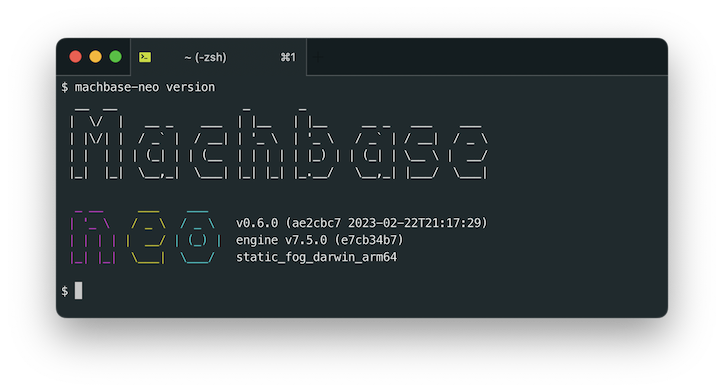
machbase-neo gen-config
Prints out default config template.
$ machbase-neo gen-config ↵

define DEF {
    LISTEN_HOST       = flag("--host", "127.0.0.1")
    SHELL_PORT        = flag("--shell-port", "5652")
    MQTT_PORT         = flag("--mqtt-port", "5653")
    HTTP_PORT         = flag("--http-port", "5654")
......