GROUP()
Syntax
GROUP( [lazy(boolean)] [, by()] [, aggregator...] )lazy(boolean)sets lazy mode (default:false).by(value [, timewindow()] [, name])specifies how to make groups with the given value.by()was mandatory inGROUP(), but it has become optional Since v8.0.14 so that aggregators can be applied to the whole data at once.aggregatorlist of aggregators; multiple functions can be given, separated by commas.
| |
Result

by()
by() takes a value as the first argument and, optionally, timewindow() and name.
Syntax: by( value [, timewindow] [, label] )
valuegrouping value, usually time or a string.timewindow(from, until, period)specifies the time range.labelstring sets the new column label (default:"GROUP").
lazy()
Syntax: lazy(boolean)
If it is set to false, which is the default, GROUP() compares the by() value of the current record with that of the previous record,
and produces a new record whenever the value changes. As a result, it makes a group only if consecutive records have the same by() value.
If lazy(true) is set, GROUP() collects all records until the end of the input stream before yielding any record, so that unsorted by() values can be grouped, but it consumes a lot of memory.
timewindow()
Syntax: timewindow( from, until, period )
Since v8.0.13
from,untiltime are the time range. Note that from is inclusive and until is exclusive. Regardless of the existence of actual data, you can specify the desired time range.periodduration represents the time interval between from and until.
See the timewindow example
Analyzing and visualizing data stored in a database can be cumbersome, especially when there is no data in the desired time range or when there are multiple data points.
For example, when displaying a time-value chart at fixed intervals, simply querying the data with a SELECT statement and inputting it into the chart library may result in time intervals between records that do not align with the chart’s time axis. This misalignment can occur due to missing intermediate data or densely packed data within a time period, making it difficult to format the data as desired.
Typically, application developers create an array of fixed time intervals and iteratively fill the elements (slots) of the array by traversing the query result records. When a slot already contains a value, it is maintained as a single value through a specific operation (e.g., min, max, first, last). At the end, slots without values are filled with arbitrary values (e.g., 0 or NULL).
With timewindow(), you can do this work within TQL.
aggregator
If no aggregator is specified, GROUP produces one record per group that contains only the by() value.
For example, GROUP( by(value(0)) ) over the records ["A",1], ["A",2], ["B",3] produces two records, A and B, and the other values are dropped.
To keep the values of a group, specify an aggregator such as list().
Aggregator
Syntax: function_name( value [, value...] [, where()] [, nullValue()] [, predict()] [, label])
valueone or more values, depending on the function.where( predicate )takes a boolean expression; only the values for which the predicate istrueare aggregated.nullValue(alternative)specifies an alternative value to use instead ofNULLwhen the aggregator has no value to produce.predict(algorithm)specifies an algorithm to predict a value to use instead ofNULLwhen the aggregator has no value to produce.labelstring sets the label of the column (default is the name of the aggregator function).
There are two types of aggregator functions.
- Type 1 functions keep only the final candidate value for the result.
- Type 2 functions hold the whole data of a group, use the data to produce the result of the aggregation, and then release the memory for the next group. If
GROUP()useslazy(true)and Type 2 functions together, it holds the entire input data of the related columns.
Options
The where(), nullValue(), predict() and label arguments are optional, and they are represented as option in the syntax of each function below.
where()
Syntax: where(predicate)
Since v8.0.13
See the where example
nullValue()
Syntax: nullValue(alternative)
Since v8.0.13
See the nullValue example
predict()
Syntax: predict(algorithm)
Since v8.0.13
See the predict example
| algorithm | description |
|---|---|
PiecewiseConstant | A left-continuous, piecewise constant 1-dimensional interpolator. |
PiecewiseLinear | A piecewise linear 1-dimensional interpolator |
AkimaSpline | A piecewise cubic 1-dimensional interpolation with continuous value and first derivative. See https://www.iue.tuwien.ac.at/phd/rottinger/node60.html |
FritschButland | A piecewise cubic 1-dimensional interpolation with continuous value and first derivative. See Fritsch, F. N. and Butland, J., “A method for constructing local monotone piecewise cubic interpolants” (1984), SIAM J. Sci. Statist. Comput., 5(2), pp. 300-304. |
LinearRegression | Linear regression with nearby values |
Functions
The x of the Type 1 functions below is a float value.
avg()
Type 1, Syntax: avg(x [, option...])
Average of the values in a group.
sum()
Type 1, Syntax: sum(x [, option...])
Total sum of the values in a group.
count()
Type 1, Syntax: count(x [, option...])
Since v8.0.13
Count of the values in a group.
first()
Type 1, Syntax: first(x [, option...])
The first value of the group.
last()
Type 1, Syntax: last(x [, option...])
The last value of the group.
min()
Type 1, Syntax: min(x [, option...])
The smallest value of the group.
max()
Type 1, Syntax: max(x [, option...])
The largest value of the group.
rss()
Type 1, Syntax: rss(x [, option...])
Root sum square
rms()
Type 1, Syntax: rms(x [, option...])
Root mean square
list()
Type 2, Syntax: list(x [, option...])
Since v8.0.15
xfloat value
list() aggregates all x values and produces a single list that contains the individual values.
Combined with JSON(rowsArray(true)) or FLATTEN(), the result can be shaped in various forms.
| |
{
    "data": {
        "columns": ["GROUP", "LIST"],
        "types": ["string", "list"],
        "rows": [
            ["A", [1,2]],
            ["B", [3,4]],
            ["C", [5]]
        ]
    },
    "success": true,
    "reason": "success",
    "elapse": "220.375µs"
}lrs()
Type 2, Syntax: lrs(x, y [, weight(w)] [, option...])
Since v8.0.13
xfloat or timeyfloat valueweight(w)if omitted, all of the weights are 1.
Linear Regression Slope, assuming x-y is a point on an orthogonal coordinate system. x can be a number or time type.
mean()
Type 2, Syntax: mean(x [, weight(w)] [, option...])
xfloat valueweight(w)if omitted, all of the weights are 1.
mean() computes the weighted mean of the grouped values. If all of the weights are 1, use the lightweight avg() for better performance.
mean($x$, weight($w$)) = $ \frac{\sum {w_i x_i}} {\sum {w_i}} $
cdf()
Type 2, Syntax: cdf(x, q [, weight(w)] [, option...])
Since v8.0.14
xfloatqfloatweight(w)if omitted, all of the weights are 1.
cdf() returns the empirical cumulative distribution function value of x, that is the fraction of the samples less than or equal to q.
cdf() is theoretically the inverse of the quantile() function, though it may not be the actual inverse for all values q.
correlation()
Type 2, Syntax: correlation(x, y [, weight(w)] [, option...])
Since v8.0.14
x,yfloat valueweight(w)if omitted, all of the weights are 1.
correlation() returns the weighted correlation between the samples of x and y.
correlation($x$, $y$, weight($w$)) = $ \frac{\sum {w_i (x_i - \bar{x}) (y_i - \bar{y})}} {stdX * stdY} $, ($\bar{x}$ = mean x, $\bar{y}$ = mean y)
covariance()
Type 2, Syntax: covariance(x, y [, weight(w)] [, option...])
Since v8.0.14
x,yfloat valueweight(w)if omitted, all of the weights are 1.
covariance() returns the weighted covariance between the samples of x and y.
covariance($x$, $y$, weight($w$)) = $ \frac{\sum {w_i (x_i - \bar{x}) (y_i - \bar{y})}} { \sum {w_i} -1 } $, ($\bar{x}$ = mean x, $\bar{y}$ = mean y)
quantile()
Type 2, Syntax: quantile(x, p [, weight(w)] [, option...])
Since v8.0.13
xfloat valuepfloat fractionweight(w)if omitted, all of the weights are 1.
quantile() returns the sample of x such that x is greater than or equal to the fraction p of samples; p should be a number between 0 and 1.
It returns the lowest value q for which q is greater than or equal to the fraction p of samples.
quantileInterpolated()
Type 2, Syntax: quantileInterpolated(x, p [, weight(w)] [, option...])
Since v8.0.13
xfloat valuepfloat fractionweight(w)if omitted, all of the weights are 1.
quantile() returns the sample of x such that x is greater than or equal to the fraction p of samples; p should be a number between 0 and 1.
The return value of quantileInterpolated() is linearly interpolated.
median()
Type 2, Syntax: median(x [, weight(w)] [, option...])
xfloat valueweight(w)if omitted, all of the weights are 1.
Equivalent to quantile(x, 0.5 [, option...]).
medianInterpolated()
Type 2, Syntax: medianInterpolated(x [, weight(w)] [, option...])
xfloat valueweight(w)if omitted, all of the weights are 1.
Equivalent to quantileInterpolated(x, 0.5 [, option...]).
stddev()
Type 2, Syntax: stddev(x [, weight(w)] [, option...])
weight(w)if omitted, all of the weights are 1.
stddev() returns the sample standard deviation.
stderr()
Type 2, Syntax: stderr(x [, weight(w)] [, option...])
weight(w)if omitted, all of the weights are 1.
stderr() returns the standard error in the mean with the standard deviation of the given values.
entropy()
Type 2, Syntax: entropy(x [, option...])
Shannon entropy of a distribution. The natural logarithm is used.
mode()
Type 2, Syntax: mode(x [, weight(w)] [, option...])
weight(w)if omitted, all of the weights are 1.
mode() returns the most common value in the dataset specified by value and the given weights.
Strict float64 equality is used when comparing values, so users should take caution.
If several values are the mode, any of them may be returned.
moment()
Type 2, Syntax: moment(x, n [, weight(w)] [, option...])
Since v8.0.14
xfloat64 valuenfloat64 momentweight(w)if omitted, all of the weights are 1.
moment() computes the weighted n-th moment of the samples.
variance()
Type 2, Syntax: variance(x [, weight(w)] [, option...])
Since v8.0.14
xfloat valueweight(w)if omitted, all of the weights are 1.
variance() computes the unbiased weighted variance of the grouped values.
When weights sum to 1 or less, a biased variance estimator should be used.
| |

Examples
timewindow()
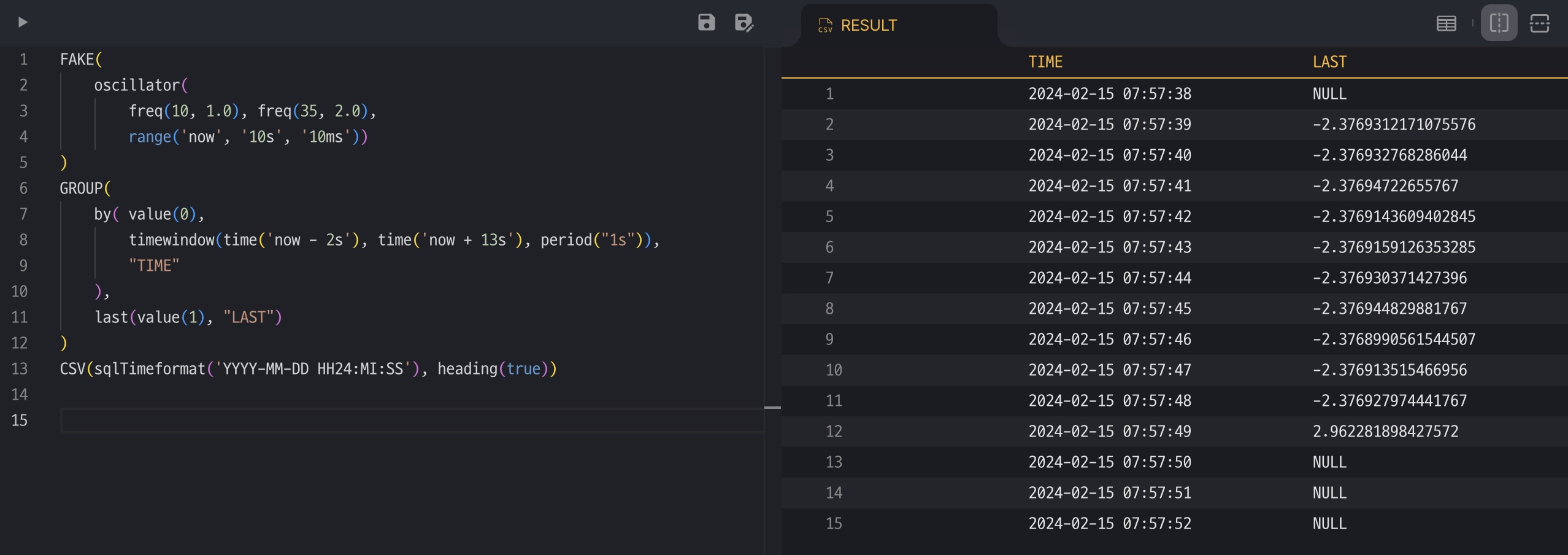
FAKE() generates a time-value record every 10ms, so there are 100 records within 1 second.
Executing the TQL below produces data at 1-second intervals (period("1s") in timewindow()),
and if there is no actual data (record) in the desired time period, it is filled with the default value NULL.
| |
nullValue()
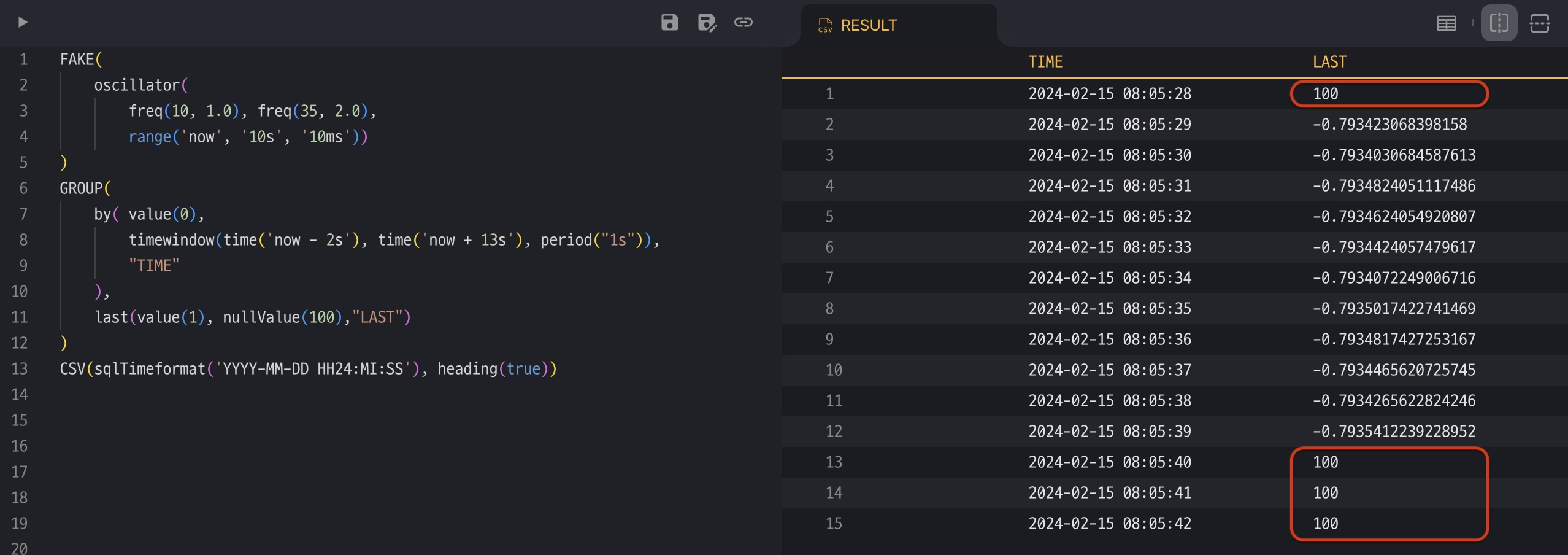
Let’s add nullValue(100) and execute it again. The NULL values are replaced with the given value 100.
| |
predict()
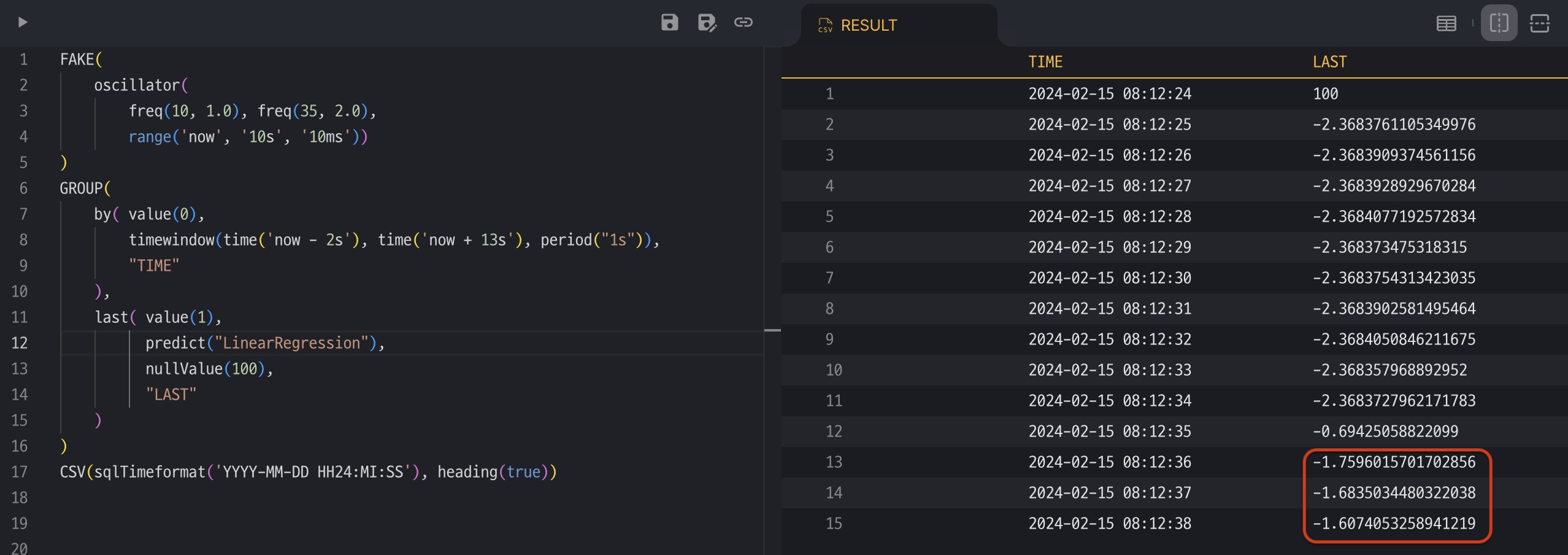
Beyond filling empty values (NULL) with a constant specified by nullValue(), it is possible to obtain interpolated data by referring to adjacent values.
Using the example above, add predict("LinearRegression") to last() and execute it again. The records that returned NULL because there was no value are now filled with the values predicted by linear regression.
predict() may fail to produce an interpolated value when there are not enough nearby values to predict from; then nullValue() is applied instead. If nullValue() is not given, NULL is returned.
| |
where()
Let’s say there are two sensors that measure temperature and humidity, and each one stores data every 1 second. In the real world, there is always a time difference among sensor systems, so the stored data might look like the samples below.
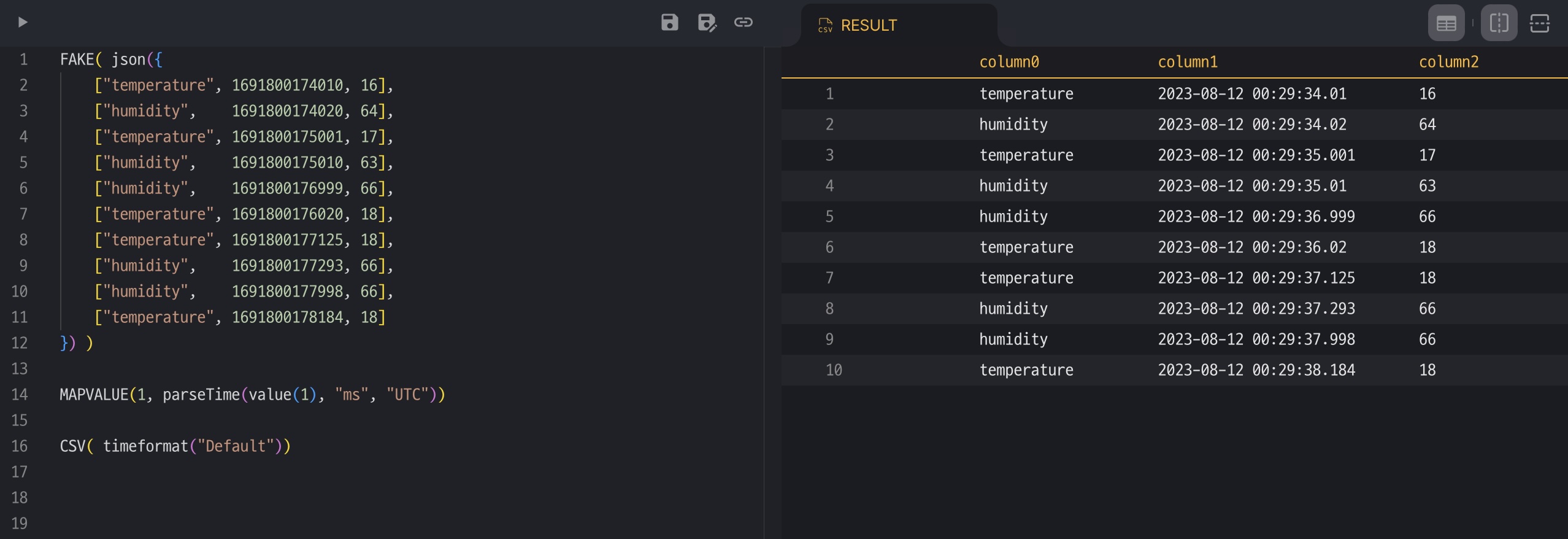
The humidity data of record #5 was stored earlier than expected, and the same happens again on record #9. Let’s normalize the data to second precision.
| |
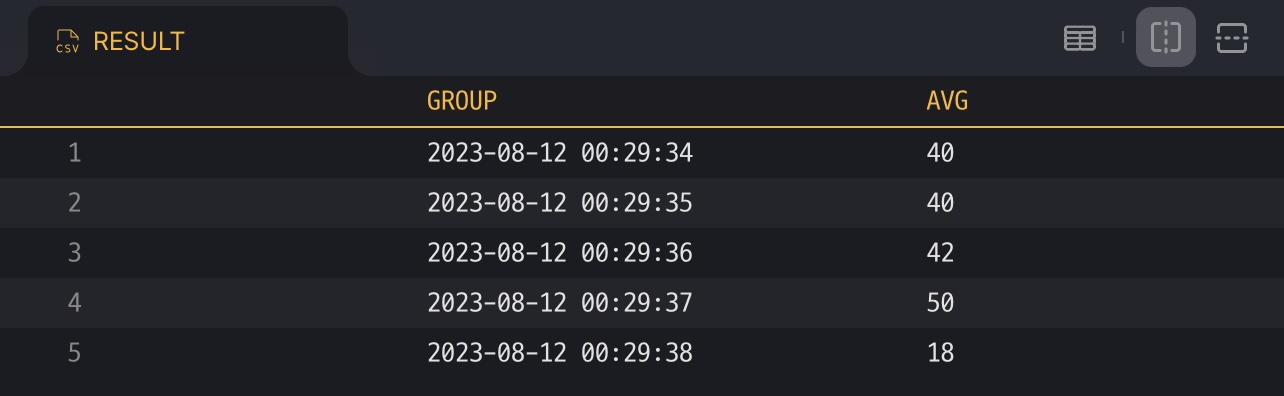
roundTime(..., "1s") aligns the time values to seconds, and then the records that have the same time are grouped.
avg(...) produces the average value of a group.
However, the first column, which indicates whether the value is temperature or humidity, is lost, so the result values become meaningless.
To solve this problem, use where(). Aggregator functions accept values only when the predicate of where() is true.
| |

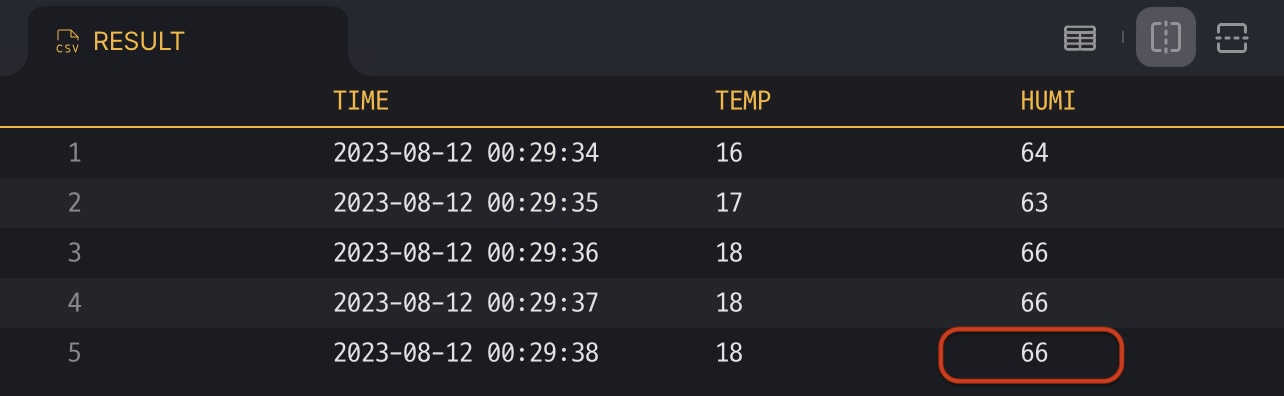
It is also possible to interpolate the missing data of the last record with predict() and nullValue().
| |
Chart
| |
Result